
BuzzStream is one of the oldest outreach tools in link building, and in 2026 it leans toward digital PR. It calls itself "the world's best outreach CRM" and an all-in-one digital PR and link building solution: a shared database of websites and people, prospect lists from any SERP or list of URLs, contact discovery, templates with automated follow-ups, link monitoring and team reports. Plans run from $49 a month with no contract; automated follow-ups start on Growth at $174.
It is built for teams that already run outreach and want one place for contacts, conversations and results, and it is strongest where PR and link building meet: its newest product, ListIQ, builds journalist lists with AI and is priced separately. The work that produces a link stays with you: finding and qualifying the pages, writing every email, connecting and warming your own mailboxes, and answering every reply.
We checked every price and limit on buzzstream.com on October 28, 2026 and read the 165 reviews on G2 and 22 on Capterra. Disclosure: this review is written by GEOboom's team, which builds a competing outreach tool. We say so wherever it affects a judgement, and we list the cases where BuzzStream is the better choice.
BuzzStream at a glance
| What it is | Outreach CRM for digital PR and link building; in BuzzStream's own words, "the world's best outreach CRM" |
|---|---|
| Best for | Teams with their own prospect lists, templates and mailboxes that need a shared database, follow-ups and link monitoring; PR teams building journalist lists |
| Not ideal for | Anyone who wants the tool to find and qualify the pages, write the emails or provide the mailboxes; teams whose prospect list is the pages AI answers cite |
| Starting price | $49/mo (Starter): 1 user, 500 contacts, 30 prospecting searches, 1,000 monitored links. Automated follow-ups and bulk send start on Growth at $174/mo |
| Contract | None: monthly, change or cancel any time; a year paid upfront gets one month free |
| Mailboxes | Your own Gmail, Office 365, Exchange or any IMAP/SMTP account, with a daily send limit you set; no warm-up |
| Trial | Free trial on every plan, self-serve |
| Key strength | Low entry price, no contract, one database for the whole team's contacts and conversations, link monitoring from the first plan |
| Main limitation | Every step that produces the link is yours: finding pages, qualifying them, writing, mailboxes, replies |
| Ratings | 4.2/5 from 165 reviews on G2; 4.5/5 from 22 on Capterra; the newest review on either site is from spring 2025 |
| Verdict | The pick for organising outreach you already know how to run, cheaply and without a contract. It keeps the records; the outreach is still yours to do. |
BuzzStream pros and cons
Pros
- No contract, low entry price. $49 a month, monthly, cancel any time, a free trial on every plan; pay a year upfront and one month is free.
- One database for the team. Websites, people, conversations, notes and tasks in one place, so anyone can see who has already talked to a site and where the relationship stands.
- Prospecting from anything you can search. Any SERP or list of URLs becomes a prospect list; automatic web and news searches build lists in seconds; the Chrome extension adds sites as you browse, and BuzzStream collects contact info and metrics for each one.
- Follow-ups that stop on reply. From Growth: sequences, scheduling, bulk send, reminders, and statistics on which templates and subject lines get answers.
- Link monitoring on every plan. From 1,000 links on Starter to 100,000 on Professional, checked every two weeks, with a notice when a link disappears, turns nofollow or changes anchor.
- Built for PR as well as links. ListIQ builds and vets journalist lists with AI; PR, content promotion and partner recruitment are supported use cases.
Cons
- Automation starts at $174. Starter has templates and reminders but no bulk send and no automated follow-ups, for one user and 500 contacts.
- You bring the mailboxes. BuzzStream sends through the Gmail, Office 365, Exchange or IMAP accounts you connect; domains, DNS records and warm-up are yours, and there is no deliverability monitoring.
- No help with writing. Templates with merge fields; personalisation comes from your own notes and research. BuzzStream's AI is ListIQ, a separate product for journalist lists.
- Contact quality. Capterra reviewers repeatedly flag inaccurate or missing contact data, including from the Chrome extension; the documented fix is connecting your own Hunter.io account.
- A dated interface and a learning curve. G2 puts implementation at about two months; reviewers call the interface dated and cluttered and the documentation thin.
- Monitoring stops at the link. The text of a mention and your position in a listicle are not tracked, and one G2 reviewer reports live links shown as missing.
How BuzzStream works
BuzzStream organises link building and mention outreach around projects: a list of websites and people goes in, conversations and won links are recorded against each record, and reports show who did what. This is the path a campaign takes.
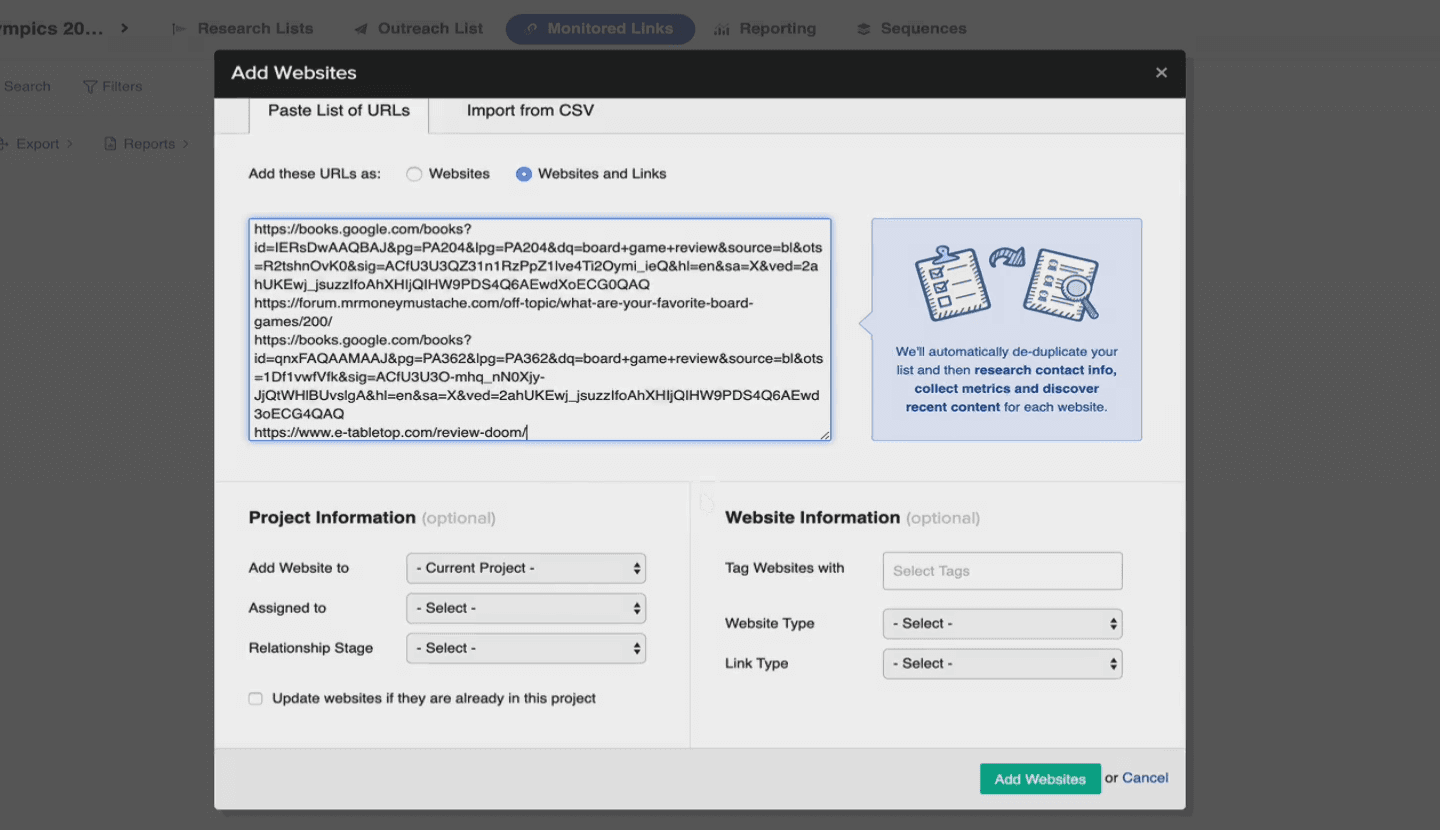
- Build a list. Create a project, then turn a Google SERP or a list of URLs into prospects, run automatic web and news searches, or add sites while you browse with the Chrome extension. BuzzStream collects contact info, website stats and social metrics for each record. Prospecting searches: 30 a month on Starter, 250 on Growth, 1,000 on Professional.
- Qualify it. Sort and filter by authority, influence and history: who is most influential, which sites are most authoritative, who has promoted you before, who on your team already knows the person. Then flip through the list and decide. The tool sorts; the judgement is yours.
- Find the contact. Contact info discovery pulls emails and social profiles from the site on every plan. With your own Hunter.io account and API key you can also search Hunter from inside BuzzStream.
- Write and send. Templates with merge fields; you personalise from conversation history, notes and the contact's recent posts in one view. Email goes from the Gmail, Office 365, Exchange or IMAP/SMTP account you connect, with a daily send limit you set per account. Bulk send, scheduling and automated follow-ups start on Growth.
- Work the replies. Replies land in BuzzStream's mailbox against the contact, the project and a relationship stage that updates itself (attempting to reach, replied, bounce, unsuccessful with no reply). The team sees each other's conversations, notes and tasks. You write each answer.
- Track the link and report. Add the links you win and BuzzStream checks them every two weeks, flagging removals, nofollow and anchor changes: 1,000, 25,000 or 100,000 links by plan. Project, message, link and team reports; link reporting from Growth, team performance reports and unlimited customisation on Professional.
Limits. Every step above runs on what you bring: the list, the words, the mailboxes. ListIQ, BuzzStream's AI product, is a separate Chrome extension for journalist lists with its own credits, free for about 50 contacts and $49–199 a month for about 200 to 2,000.
BuzzStream features
We look at every outreach tool through the seven steps that decide whether a campaign produces a link. For each one: what BuzzStream does, what it solves, where it stops, and how it compares with GEOboom.
1. Where the prospects come from
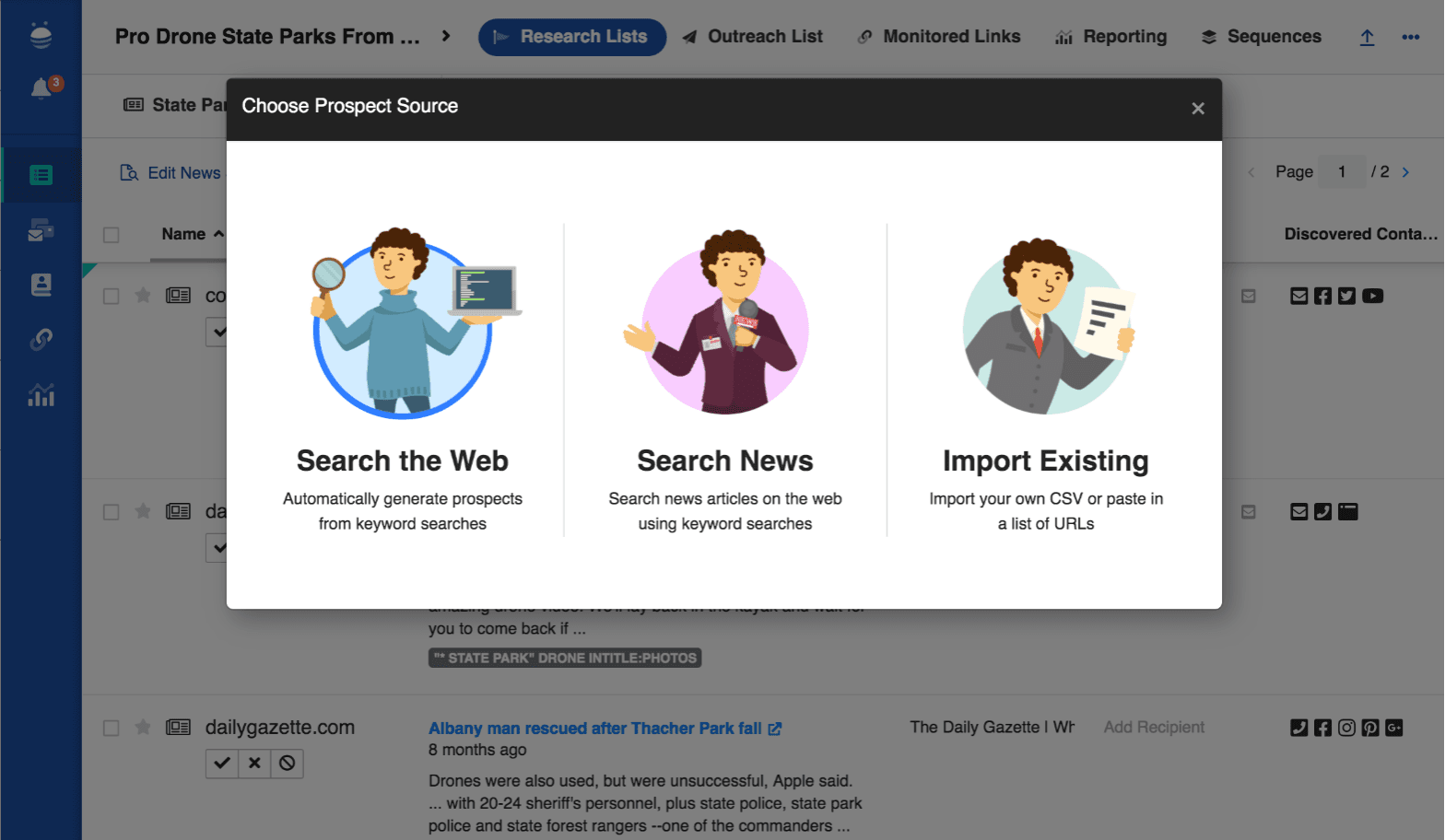
What it does. Any Google SERP or list of URLs becomes a prospect list; automatic prospecting runs web and news searches and builds a list in seconds; the Chrome extension adds bloggers, websites and social profiles to your database as you browse. Upload a list of URLs and BuzzStream collects contact information, website stats and social metrics for each. Prospecting searches: 30 a month on Starter, 250 on Growth, 1,000 on Professional.
What it solves. Lists stop living in spreadsheets; anything you can search becomes a project the whole team works from.
Limits. The sources are search results and lists you bring. If the goal is a mention on the pages AI answers cite, that list lives in your AI-visibility tracker and gets in as an upload.
Compared. GEOboom takes the cited pages from your AI-visibility tracker or the prompts you track and keeps adding new ones as they appear; keywords and uploaded lists work too. For journalist lists BuzzStream has ListIQ; for the pages that shape AI answers, GEOboom starts where the citations are.
2. Whether the list is filtered before you see it
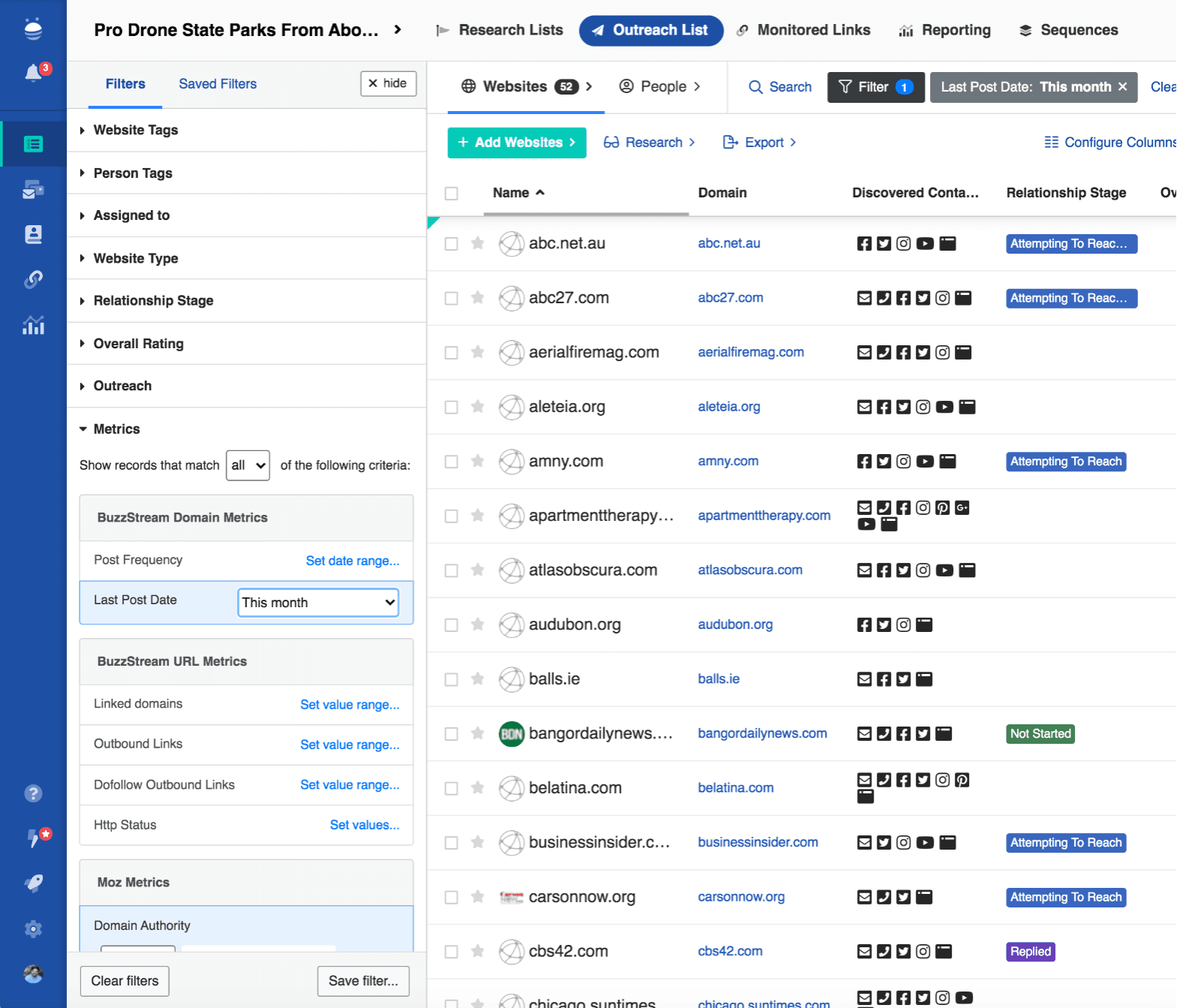
What it does. Intelligent segments: sort and filter by authority, influence and history. Each record carries publisher and influencer metrics, contact info and social profiles, and BuzzStream shows who has promoted you before and whether someone on your team already knows the contact.
What it solves. The strongest sites rise to the top, and nobody cold-pitches a blogger a colleague already works with.
Limits. Qualification is manual. Topical fit against your brand, competitors' own sites, pages that already mention you and link farms are not filtered for you; you flip through the list and decide.
Compared. GEOboom reads each page against your brand and topic and sets aside off-topic pages, competitors, pages that already mention you and link farms before you see the list, then orders the rest by how often they are cited. Reading and filtering cost nothing; you pay only for the publishers it keeps. BuzzStream gives you the metrics; GEOboom gives you the list.
3. Which contact it finds
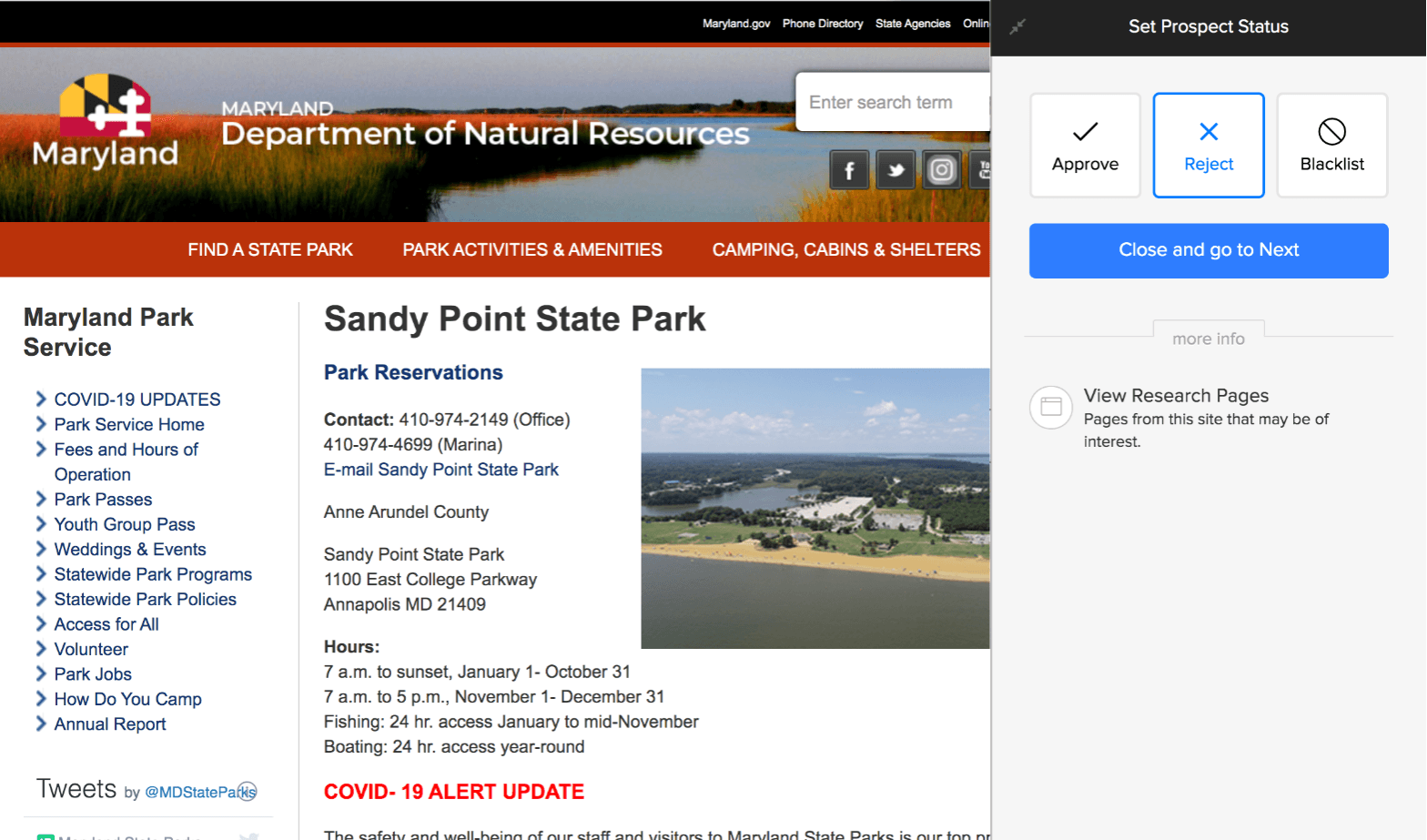
What it does. Contact info discovery on every plan pulls emails and social profiles from the site into the record; filters find contacts with or without a discovered email, name or role; duplicates merge. With your own Hunter.io account and API key, Hunter searches run from inside BuzzStream.
What it solves. Emails and profiles land on the record without copy-paste between tools.
Limits. The contact is what the site and its social profiles expose. Capterra reviewers repeatedly flag inaccurate or missing contact data, including from the extension, and a second subscription is the documented way to fill the gaps.
Compared. GEOboom goes to the editor from the masthead, then the article's author from the byline, then the content lead on LinkedIn, with hello@ only if nobody answers, and finds a verified contact at over 90% of sites. The first email goes to the person who decides what goes on the page.
4. Whose mailboxes you send from
What it does. You connect Gmail, Office 365, Exchange or any other provider over IMAP and SMTP, set a daily send limit per account to stay inside your provider's cap, and send a test message. Replies come back into BuzzStream against the contact.
What it solves. Outreach runs from inboxes you already own, and a busy day doesn't trip your provider's limits.
Limits. The domains, Google Workspace or Microsoft seats, SPF, DKIM and DMARC and the warm-up are yours to buy and run, typically $60–120 a month for a small setup. There is no warm-up or deliverability monitoring in BuzzStream, and a mailbox that burns out is yours to replace.
Compared. GEOboom includes three mailboxes on separate domains, warmed before your account opens and kept warm while they send, with inbox-placement tests and bounce tracking; each handles about 200 publishers a month, and three more cost $40 a month when you need them. Your company domain never sends a cold email.
5. Follow-ups and prioritisation
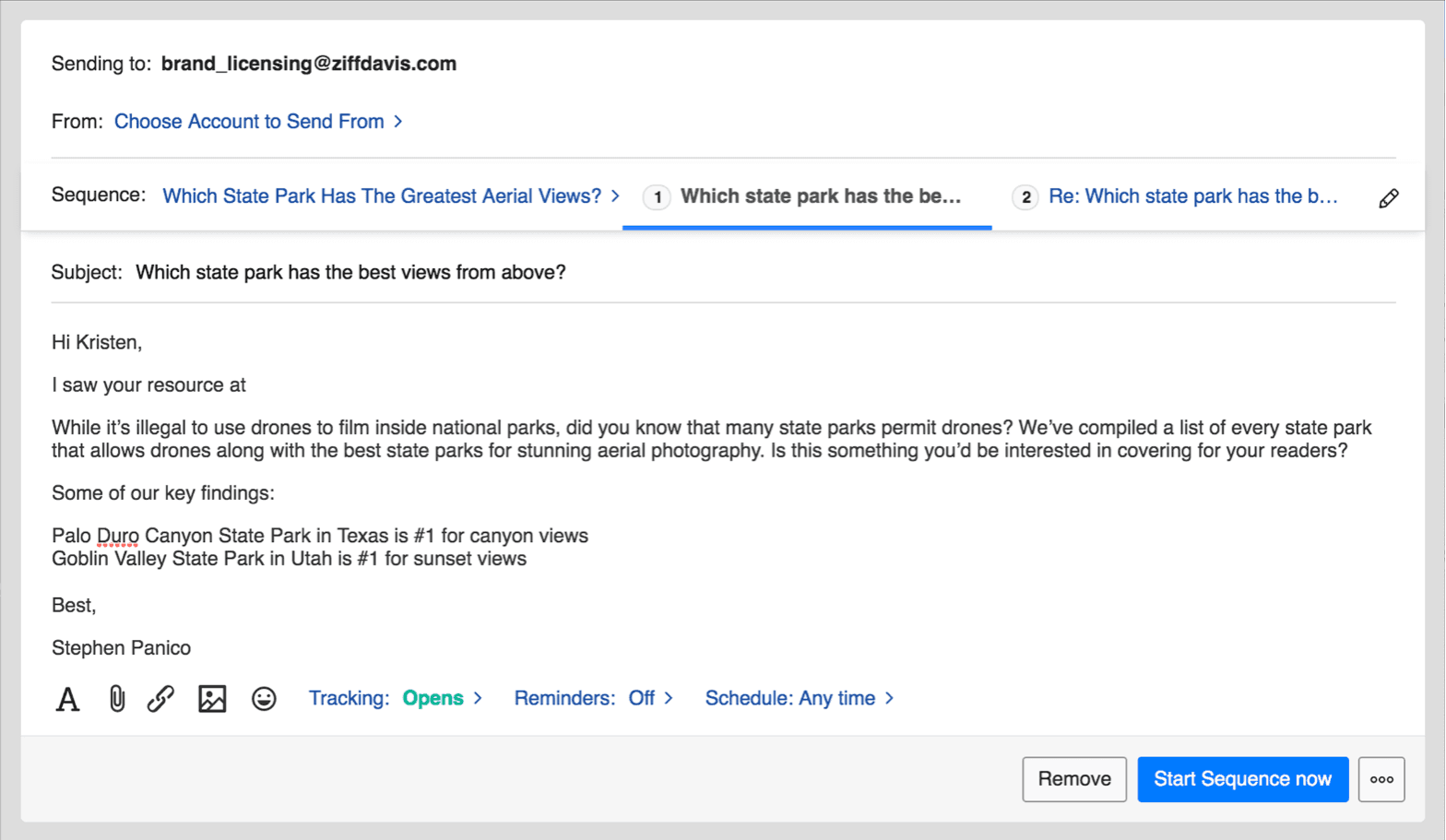
What it does. From Growth: sequences that send follow-ups automatically on rules you define, or remind you to send them, and stop when the recipient replies; email scheduling, bulk send and follow-up reminders. A contact who stays silent after the final email moves to Unsuccessful – No Reply. Starter has templates and reminders only.
What it solves. Nobody forgets the second email, and the team sees which contacts went quiet.
Limits. The rules and the order of outreach are yours to set, and automation needs the $174 plan.
Compared. GEOboom writes to up to three contacts per publisher and keeps following up for weeks by default, and orders outreach so the most-cited pages get the first emails. There is nothing to configure: the sequence comes with every publisher.
6. What arrives with a reply
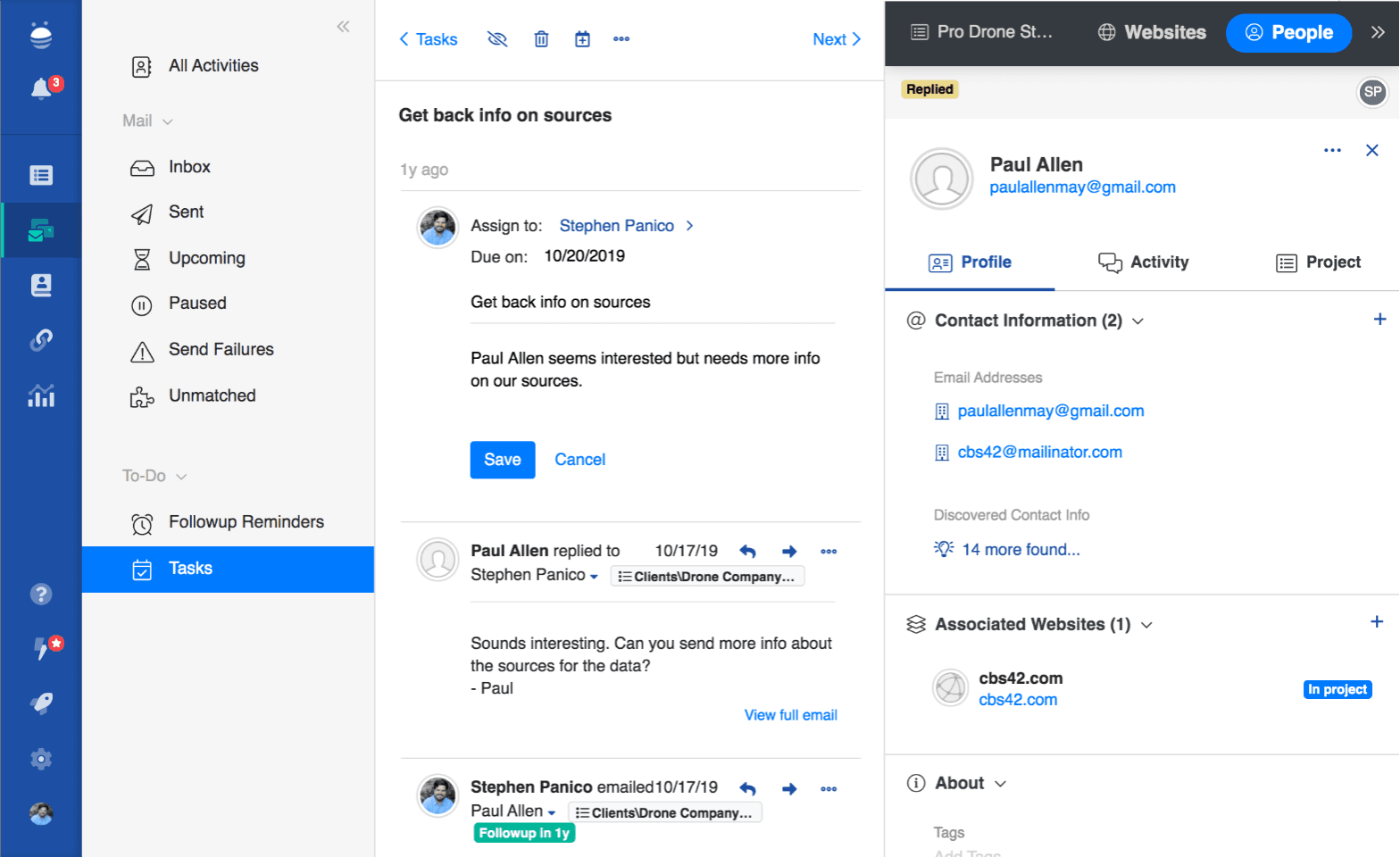
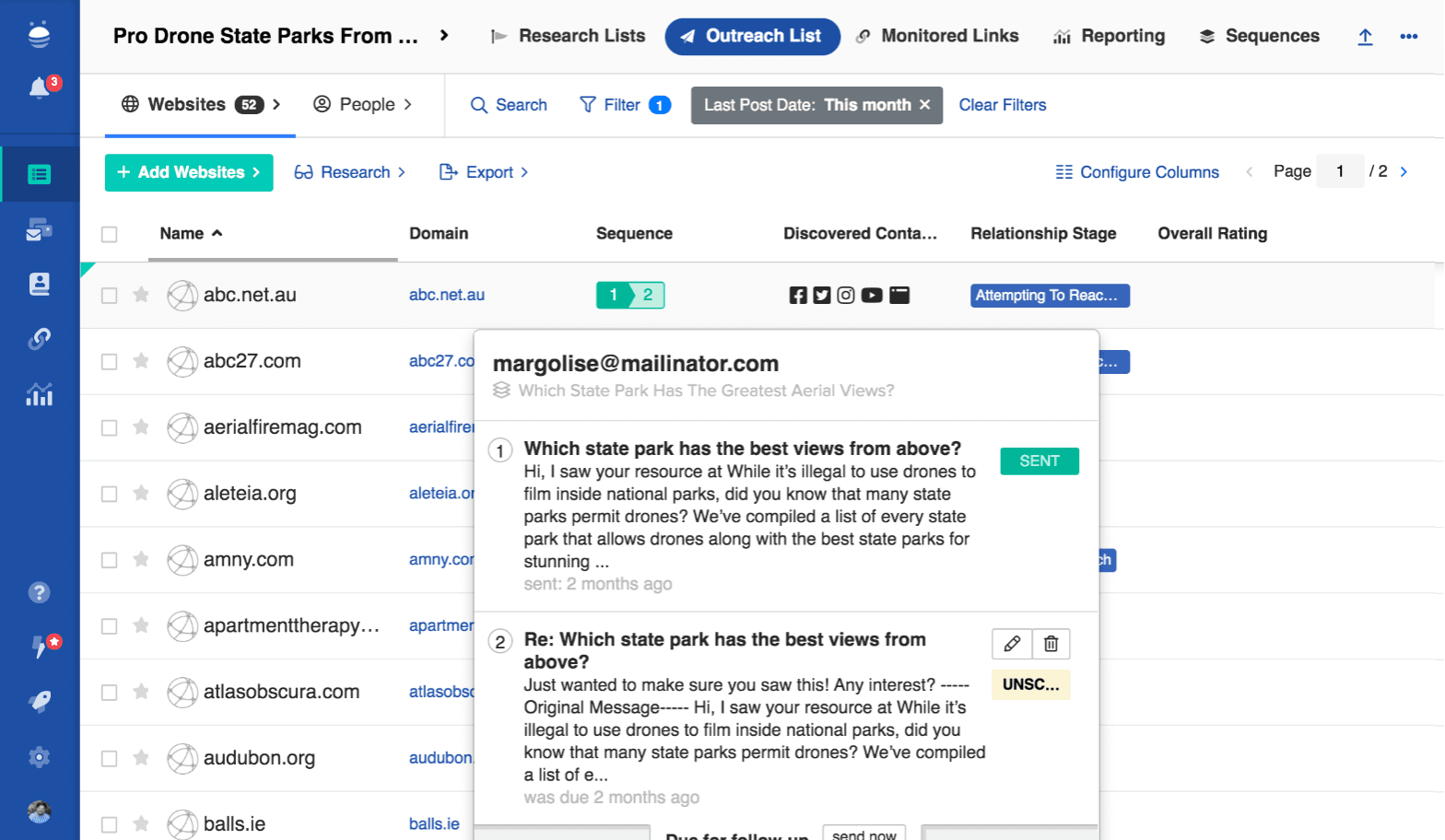
What it does. BuzzStream's mailbox shows each email with its project, contact and relationship stage. Stages update themselves on send, reply, bounce or silence; you can change stages in bulk, tag opportunities and resume a sequence after an out-of-office. Teammates see the full conversation history, notes and tasks.
What it solves. The whole team knows where every relationship stands, and a handover doesn't lose the thread.
Limits. The reply itself is yours: reading the offer, checking the publisher's other sites, choosing which page goes in, agreeing the price and writing the answer.
Compared. GEOboom hands you each reply as an offer: the publisher's other sites graded good or risky (traffic, top-10 keywords, spam score), the page to insert, the price and the answer already written. You approve or skip; the reply goes out and the agreed thread becomes a deal record. In GEOboom's published case study the client's whole job across 30 offers came to about two hours a month.
7. Whether anyone checks the placement afterwards
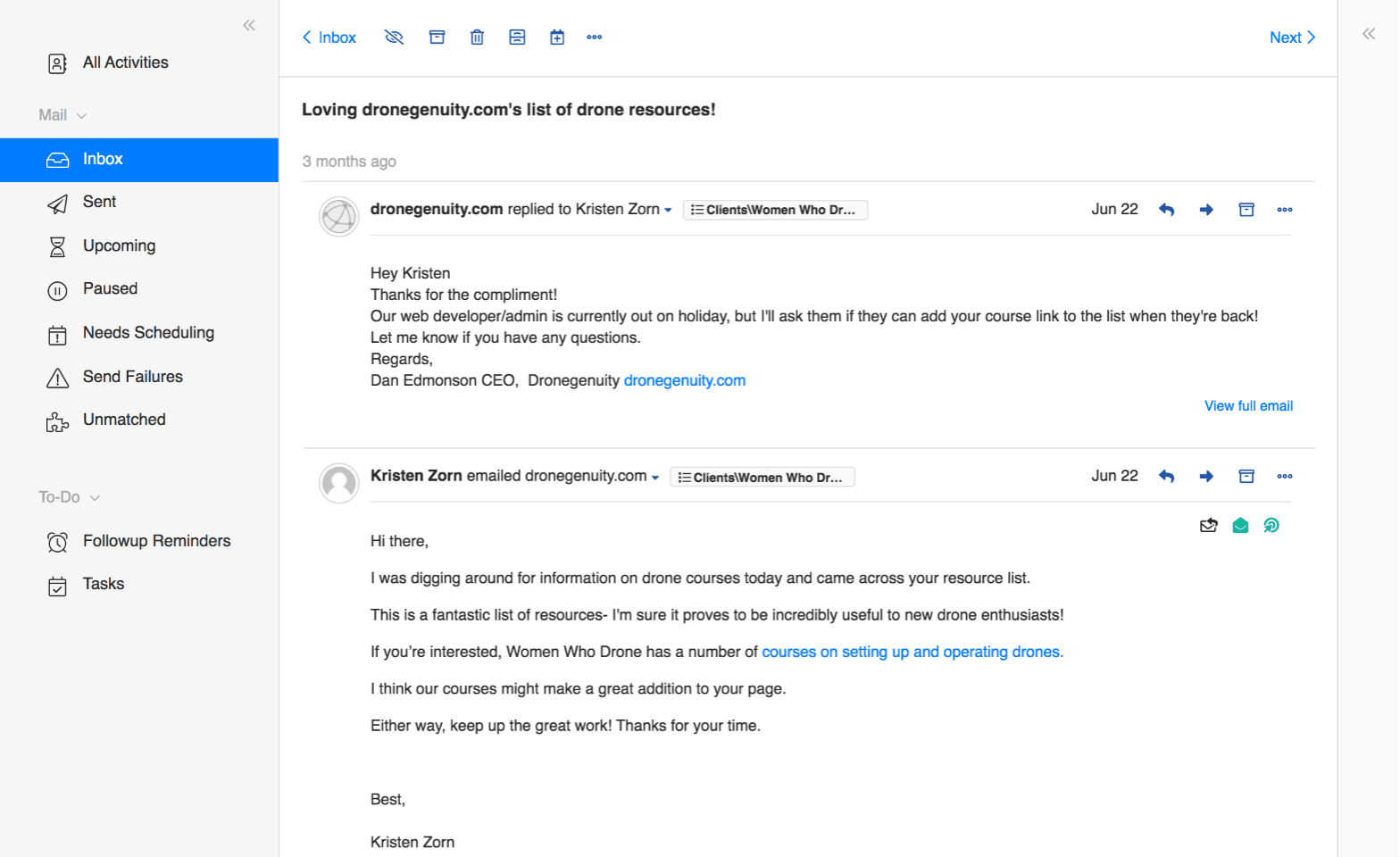
What it does. Link monitoring on every plan checks every two weeks whether each page still links to you and notifies you when a link is removed, turns nofollow or changes anchor: 1,000 links on Starter, 25,000 on Growth, 100,000 on Professional. From Growth, links reports group your links by domain authority, link type and anchor text.
What it solves. A running record of every link the team has won, at a scale few outreach tools match.
Limits. It watches the link, not the mention: the text of a listicle entry and your position in the list are not tracked, there is no note to the publisher when something moves, and one G2 reviewer reports live links shown as missing.
Compared. GEOboom checks the agreed text, your position in the list, the link, nofollow and the anchor, and when something moves sends an alert with a drafted note to the publisher asking to put it back; placements bought through Buy for you carry 12-month protection. BuzzStream counts monitored links by plan; GEOboom monitors every placement it won.
Multi-client and team
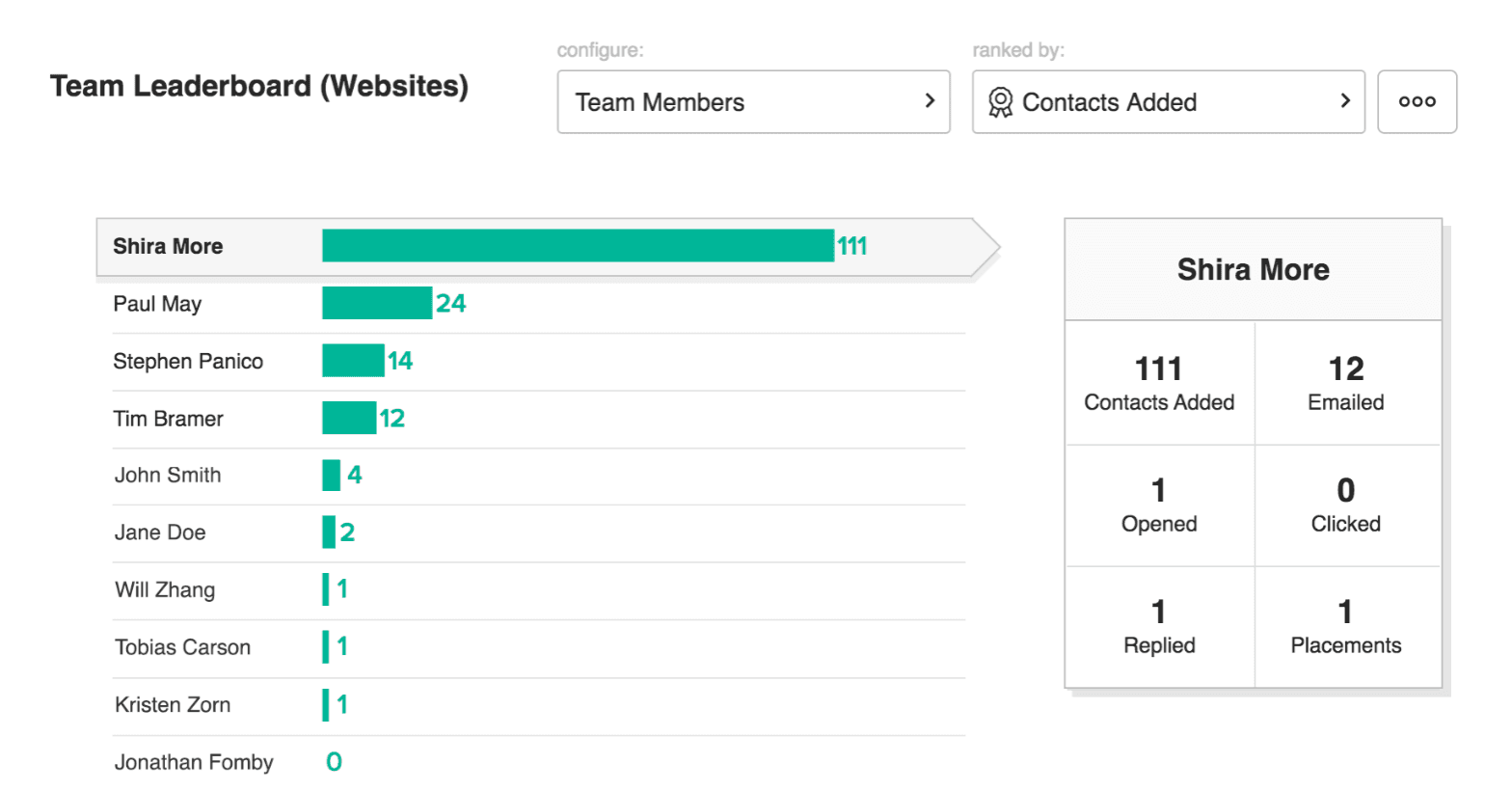
Users: 1 on Starter, 3 on Growth ($58 per extra user), 6 on Professional ($70 per extra), 12+ on Custom. Projects keep each client's lists and conversations apart; team template sharing, customizable permissions and project performance reports start on Growth; team performance reports, backup recipients and unlimited report customisation on Professional. The Manage screens add tasks, shared notes and a team activity feed. This is tooling for a team of outreach specialists. GEOboom is built so that there is no such team: unlimited users and projects on one subscription, the mailboxes owned by the account, and one person per client, an SEO, a marketer or a junior, who approves the offers that come in.
AI
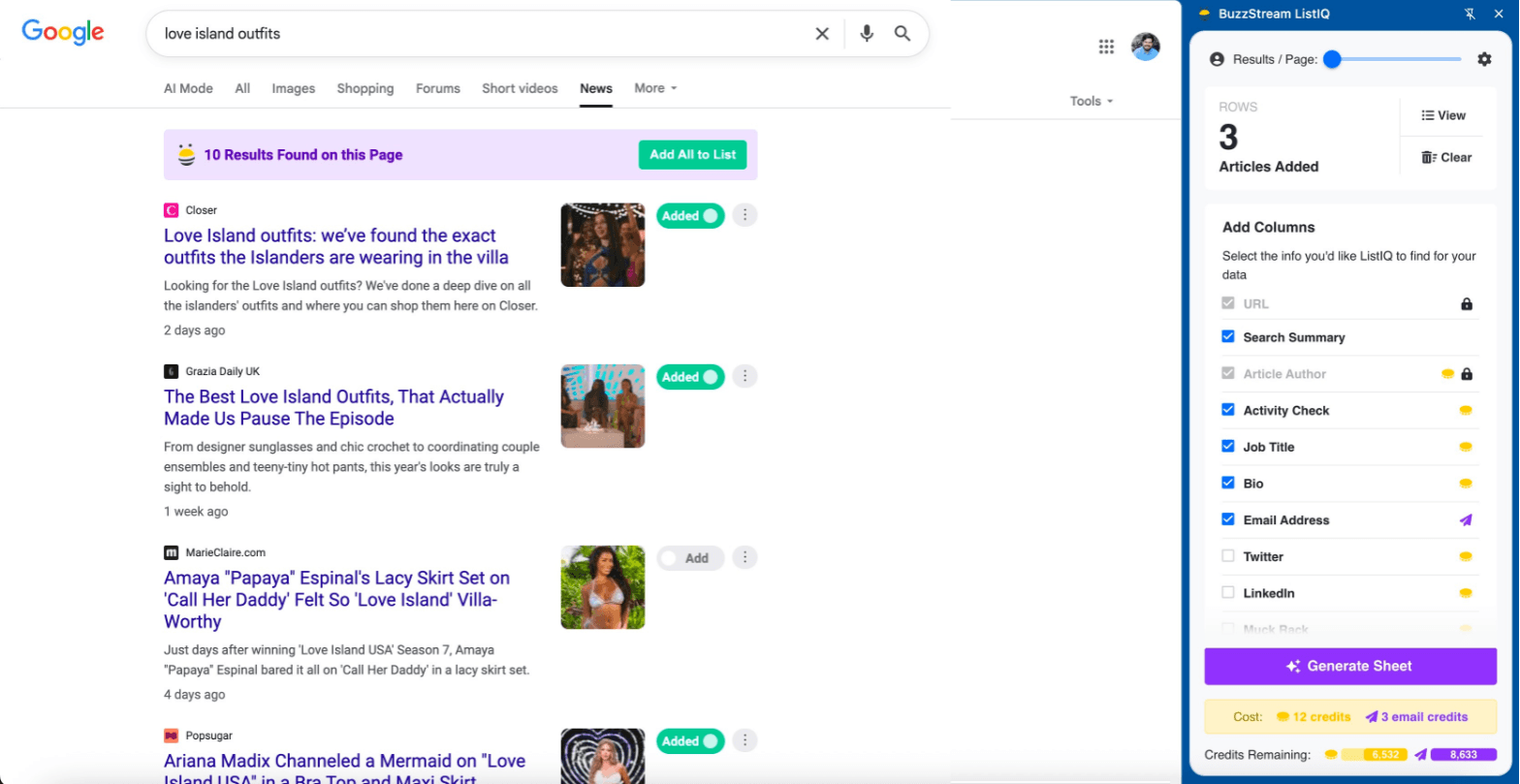
BuzzStream's AI is ListIQ, a separate Chrome extension that runs under your BuzzStream login. It turns a news search into a media list, checks whether journalists are still active and on the same beat, finds emails, social profiles, titles, bios and recent articles, re-researches old spreadsheets, and pulls authors from competitors' coverage. It has its own credits: free for about 50 contacts, then $49, $99 or $199 a month for about 200, 500 or 2,000. BuzzStream's outreach pages describe no AI in prospecting, writing or replies. GEOboom's AI reads pages for filtering, writes each email about the specific page, writes replies and blurbs, and drafts the monitoring notes.
Integrations
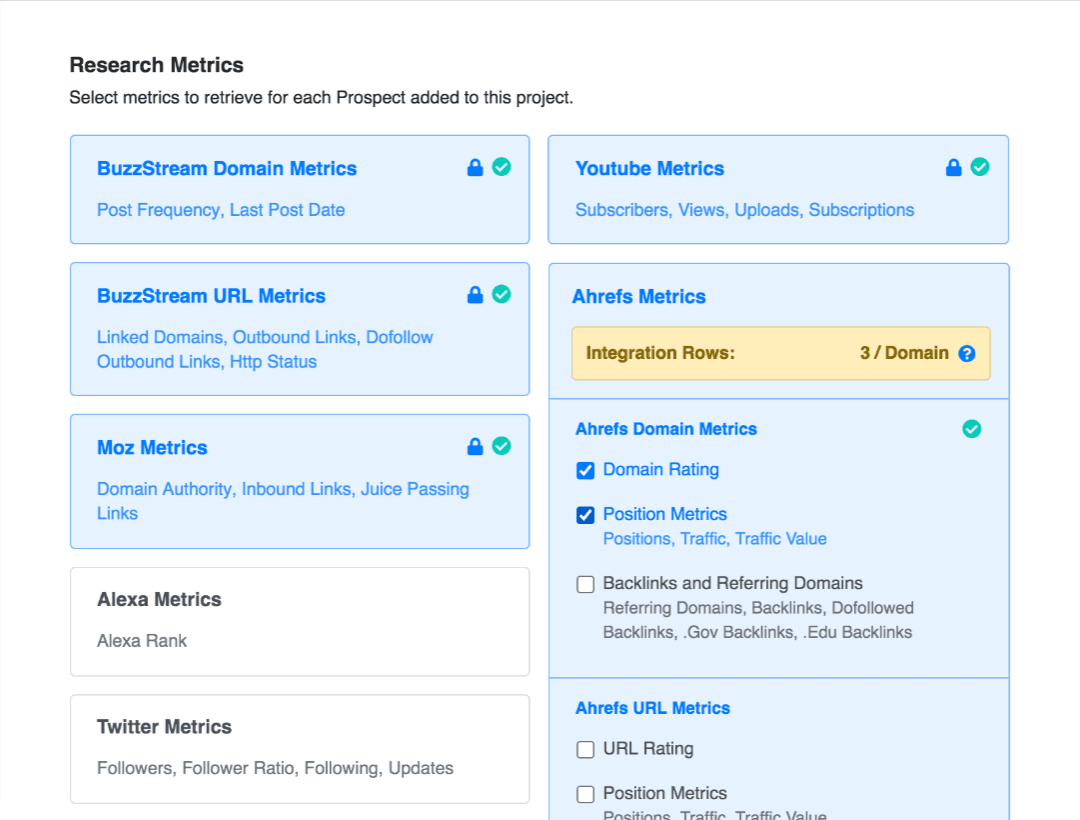
Ahrefs metrics from Growth; Hunter.io with your own account; the web services API on Professional; Gmail, Office 365, Exchange and IMAP/SMTP mail; the Chrome extension on every plan; CSV export of discovered contact info. GEOboom connects AI-visibility trackers, takes uploaded lists, and builds deal records from Google Docs and attachments.
BuzzStream pricing
BuzzStream pricing is four plans priced by users and contacts, billed monthly with no contract. Prices below were read from buzzstream.com/plans-pricing on October 28, 2026.
BuzzStream pricing plans
| Starter | Growth | Professional | Custom | |
|---|---|---|---|---|
| Price | $49/mo | $174/mo | $424/mo | From $999/mo |
| Users | 1 | 3 ($58 per extra) | 6 ($70 per extra) | 12+ |
| Contacts | 500 | 25,000 | 100,000 | 300,000+ |
| Prospecting searches / mo | 30 | 250 | 1,000 | Not listed |
| Monitored links | 1,000 | 25,000 | 100,000 | Not listed |
| What it adds | Contact info discovery; open, click and reply tracking; email templates; publisher and influencer metrics; Chrome extension | Bulk send, scheduling and reminders, automated follow-ups, email and project performance reports, link reporting, team template sharing, customizable permissions, phone and email support, Ahrefs integration | Backup recipients, team performance reporting, unlimited report customisation, web services API, dedicated account manager | Implementation plan, onboarding for new team members |
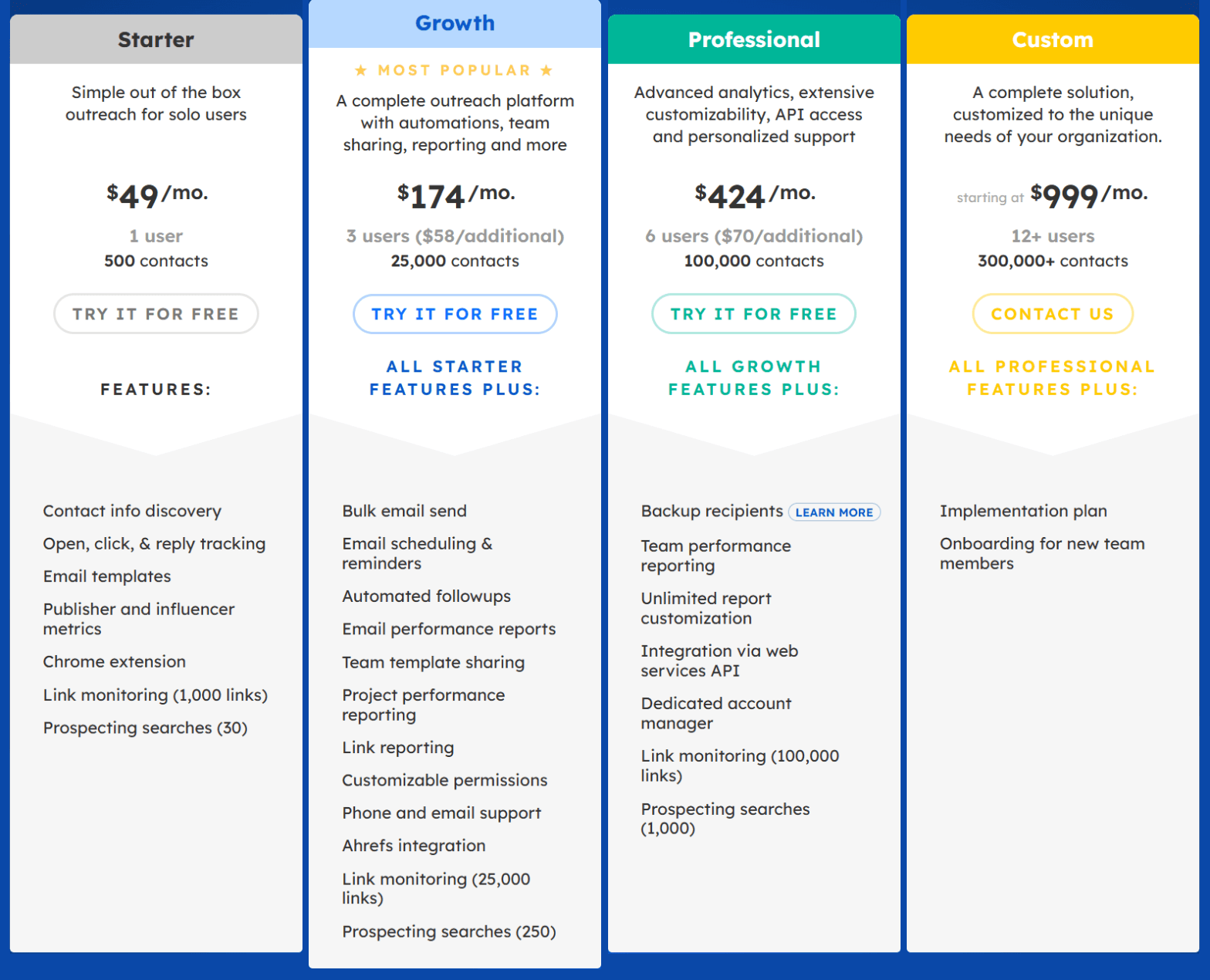
What each step up adds. Starter is a contact database with templates and tracking for one person; it can't bulk send or follow up automatically. Growth is where outreach automation begins: bulk send, scheduling, automated follow-ups, reports, permissions and Ahrefs metrics. Professional adds team performance reporting, unlimited report customisation, the API and an account manager. Custom adds an implementation plan and onboarding.
Billing terms. Plans are monthly with no minimum term; you can change or cancel any time. Paying 12 months in advance gets one month free, arranged by email with customer service after sign-up. Every plan starts with a free trial that you cancel in Settings. After cancellation BuzzStream keeps your data for 14 days, then deletes it. ListIQ is billed separately: free for 750 credits (about 50 contacts), then $49, $99 or $199 a month. One Capterra reviewer reports a 25% price increase in 2025.
Is BuzzStream pricing transparent? Yes. Prices, users, contacts, limits and features per plan sit on one public page, and G2's pricing panel matches it. Two costs are not on the cards: the mailboxes, domains and warm-up you supply, and a contact finder if the built-in discovery leaves gaps.
Which plan for whom. Starter is a solo link builder with warmed mailboxes who wants a CRM instead of a spreadsheet. Growth is the real starting point for link building: three users, automated follow-ups, bulk send and Ahrefs metrics. Professional is for teams of six or more who need team reports, the API and an account manager.
What a campaign costs on BuzzStream and on GEOboom
The standard example we use across these reviews: five placements a month on DR 40–50 sites and $120 paid to each publisher — the median paid quote from the DR 40–50 publishers who have replied to our own outreach with a price, which is an assumption about publishers rather than a BuzzStream or GEOboom price. BuzzStream is counted on Growth, the first plan with automated follow-ups, together with everything it leaves to you: mailboxes, domains, warm-up, a contact finder and the team's hours. The hours are where the two models differ most, so they are priced in too, at $5–8 an hour, the rate GEOboom's site gives for an experienced link builder.
| GEOboom, you pay publishers | GEOboom with Buy for you | BuzzStream Growth + the rest of the stack | |
|---|---|---|---|
| Software | $150/mo: 3 warmed mailboxes, unlimited users and projects, SEO data, monitoring, outreach to 100 publishers a month | $150/mo, the same subscription | $174/mo: 3 users, 25,000 contacts, automated follow-ups |
| Who you write to | About 100 publishers picked from the several hundred prospects you load: GEOboom reads every page against your site for free, sets aside off-topic pages, competitors, pages that already mention you and link farms, and orders the rest by how often AI answers cite them | Same | What your searches and lists returned, sorted by authority and qualified by you; 250 prospecting searches a month |
| Emails sent | Up to 3 contacts per publisher, follow-ups for weeks, several hundred emails a month, all written and sent for you, included | Same | Every email and follow-up written, scheduled and sent by your team |
| Mailboxes and domains | Included: 3 mailboxes on separate domains, warmed before your account opens and kept warm while they send, enough for about 600 publishers a month | Included, the same | None provided. The domains, Google Workspace or Microsoft seats, SPF/DKIM/DMARC, a warm-up tool and two to three weeks of warm-up before the first email are yours: typically $60–120/mo |
| Contact finding | Included: editor from the masthead, then author, then content lead; a verified contact at over 90% of sites | Included, the same | Discovery from the site is included; for the gaps, a Hunter or Snov.io subscription at $39–49/mo |
| Publisher fees | 5 × $120 = $600, paid by you to five publishers: PayPal, Wise, cards, invoices, each on their own terms. $120 is the median quote rather than a ceiling — in GEOboom's case study the typical paid offer sat between $40 and $200, alongside free mention exchanges | $600, paid by GEOboom from your prepaid balance | 5 × $120 = $600, paid by you to five publishers |
| Service fee | 0 | 30% per publisher payment or $40, whichever is larger. At $120 the $40 floor applies, so $200 rather than $180. One contract, one invoice, every publisher paid; 12-month placement protection | 0 |
| Your time to launch | About 10 minutes: paste the list, add your site, press start | Same | Days to weeks: domains, mailboxes and DNS, warm-up, templates and sequences, the first list built and qualified |
| Your time per month | About 2 hours: read each offer with the publisher's DR and price, approve or skip, pay | About 2 hours | 40–70 hours for an outreach tool plus your own team, by GEOboom's estimate: qualifying prospects, finding contacts, writing every email, answering every reply |
| That time at $5–8 an hour | $10–16 | $10–16 | $200–560 |
| Monthly total | $760–766 | $960–966 | $1,073–1,503 |
| Per placement | $152–153 | $192–193 | $215–301 |
| Commitment | Monthly | Monthly | Monthly, no contract |
Counted with the hours each route takes, both GEOboom routes come out below BuzzStream: $152–153 a placement paying publishers directly and $192–193 with Buy for you, against $215–301 for BuzzStream Growth with mailboxes, a contact finder and a team. The reason is what the $150 covers. GEOboom reads several hundred prospects against your site for free, keeps about 100 publishers worth writing to, finds the editor at each, and sends up to three contacts per publisher with weeks of follow-ups; you pay for the publishers it keeps and nothing per email. On BuzzStream every one of those steps is an hour of somebody's month, and $5–8 an hour is the cheapest way to staff it: at an in-house SEO's salary the gap is several times wider.
The publishers are not the same publishers either: on BuzzStream you write to what your searches returned and you qualified yourself, on GEOboom to pages already read against your site and ranked by how often AI answers cite them, so a reply there comes from a page where you belong. GEOboom's published case study, a software company that pasted 825 URLs and got 30 publisher offers in ten days, puts the client's work at ten minutes to launch and about two hours a month after that; among those 30 offers were free mention exchanges, link insertions from $75 and listings from $100, so half the publishers behind the line above asked less than $120. Buy for you takes over the part nobody enjoys: paying a dozen small publishers through a dozen different channels and keeping the receipts, under one contract and one invoice, with the placement protected for a year.
BuzzStream comes out cheaper in one case: a solo link builder with warmed mailboxes and a short list, who needs nothing but a CRM, pays $49 on Starter. A reader who wants the placements rather than the records gets the mailboxes, the contacts and the writing included on GEOboom at $150.
At volume. BuzzStream doesn't sell emails; it sells contacts and seats: 25,000 contacts and three users on Growth, 100,000 and six on Professional. How much you can send depends on the mailboxes you buy and warm yourself, and every email is one your team wrote to a site your team qualified. GEOboom doesn't meter emails at all. Prospects it reads and sets aside cost nothing; each publisher it keeps gets up to three contacts and a follow-up sequence that keeps going for weeks, all automatic, all included, for $0.50. A thousand qualified publishers a month, picked from several thousand prospects you loaded, is about $640 a month on GEOboom with the mailboxes to send it, and thousands of emails written and sent for you. The same reach on BuzzStream is Growth at $174 plus six warmed mailboxes on your own domains, a contact finder, and a team qualifying several thousand prospects and writing to a thousand sites every month. The number to compare is not emails sent but publishers worth writing to.
BuzzStream reviews and market feedback
BuzzStream holds 4.2/5 from 165 reviews on G2 (50% five-star, 37% four-star, none at one star) and 4.5/5 from 22 reviews on Capterra, with 4.4 for ease of use and 4.4 for customer service. G2 is the larger sample; most Capterra reviews date from 2017–2019.
What reviewers praise. One place for the team's contacts, campaigns and conversations instead of spreadsheets; the Chrome extension for saving prospects while browsing; templates, automated sequences and scheduled follow-ups; bulk send; several projects in one account; the entry price. Long-time users, one of them on BuzzStream for more than five years, mention how easy it is to onboard new team members, and digital PR reviewers use it daily for research and pitching.
What reviewers complain about. The interface is the most common complaint on G2: dated, cluttered, little changed in years. Capterra reviewers describe a steep learning curve and thin documentation, and G2's user insights put implementation at about two months. Several report inaccurate or missing contact info, including from the extension; others doubt the open and backlink tracking, with one G2 reviewer seeing live links reported as missing. Support is described as helpful but sometimes slow. One Capterra reviewer reports a 25% price increase in 2025 with no new features; one G2 reviewer finds it expensive for small businesses.
Two caveats. The newest review on G2 is from March 2025 and on Capterra from April 2025, so there is almost no independent feedback yet on ListIQ, the product BuzzStream now leads with. And the complaints that are structural rather than historical are contact quality and the time it takes to set up and run; both follow from a model where every step is yours.
If you are deciding on BuzzStream today, treat the ratings as evidence that the CRM holds up for teams over years, and test contact discovery on your own list during the trial before you count on it.
BuzzStream alternatives
We keep a full list in BuzzStream alternatives. The short version, grouped by what you are replacing:
- GEOboom: outreach software for the same job, with the parts BuzzStream leaves to you included. It pulls the pages your AI-visibility tracker says are cited, filters them page by page, finds the editor, sends from three warmed mailboxes it provides, writes every email and the replies you approve, and monitors the mention afterwards. $150 a month for outreach to 100 publishers, picked from the much longer list of prospects you load, which GEOboom reads and filters for free; more publishers at $0.50 each if you need them; no contract, unlimited projects and users. Launching takes about ten minutes and running it about two hours a month; in its published case study, 825 URLs turned into 30 publisher offers in ten days. The pick for an in-house SEO or marketer, or an agency running citation outreach for its clients, who wants the placements without building an outreach operation. Full comparison in BuzzStream vs GEOboom.
- Pitchbox: the deepest campaign platform in the category, with an AI Reply Agent, roles and approvals, white-label reports and digital PR; from $300 a month ($210 billed annually) on a one-year contract, with your own mailboxes. See the Pitchbox review and Pitchbox vs GEOboom.
- Respona: no longer software. A done-for-you placement service that bills $100–500 when the link is live, for teams that want links delivered rather than a tool to run. See the Respona review and Respona vs GEOboom.
- FATJOE: an outsourced link-building service with fixed prices per placement, from $72 at DR 10+ to $456 at DR 60+, white label and a lifetime guarantee. See FATJOE vs GEOboom.
- MentionAgent: an agent for mutual mention swaps on a single site, $99 a month, inbox included; the budget option when one site and free exchanges are the whole brief.
- Snov.io: finder, verifier, warm-up and sequences from $39 a month, built for sales rather than SEO; the usual add-on when BuzzStream's contact discovery leaves gaps.
For the full seven-tool comparison, see Best AI link building and outreach software.
BuzzStream vs GEOboom
Both run link building and mention outreach and both record who you wrote to and what came back. Three facts that decide between them:
- Where the list comes from. BuzzStream builds it from SERPs, URL lists, automatic web and news searches and the Chrome extension, and you qualify it by authority and history. GEOboom starts from the pages your AI-visibility tracker says are cited, sets aside off-topic pages, competitors, existing mentions and link farms, and orders the rest by how often they are cited.
- What it takes to send the first email. BuzzStream is $49–174 a month with no contract, plus the domains, mailboxes and warm-up you supply, a contact finder for the gaps, and templates you write. GEOboom is $150 a month, monthly, with three warmed mailboxes included and every email written about the specific page.
- What arrives with a reply, and what is watched afterwards. On BuzzStream the reply lands on the contact's record with its relationship stage and you write the answer; the link is checked every two weeks for presence, nofollow and anchor. On GEOboom the reply arrives as an offer with the publisher's sites graded, the page and the price, and the answer written for you to approve or skip; afterwards the mention's text and position in the list are watched too, with a drafted note when something moves.
At five DR 40–50 placements a month, with everyone's hours priced in, the cost per placement is $152–153 on GEOboom paying publishers directly and $215–301 on BuzzStream Growth with mailboxes, a contact finder and the 40–70 hours an outreach tool plus a team takes; on GEOboom your share of the work is about two hours a month. BuzzStream is for the team that wants a CRM to run its own outreach, or a PR team building journalist lists; GEOboom is for the company or agency that wants the mentions and has nobody to run outreach. Full breakdown, worked example and scoring in BuzzStream alternatives.
Who should use BuzzStream, and who should look elsewhere
BuzzStream is a good fit if:
- you already have prospect lists, templates and warmed mailboxes, and need a shared CRM to run outreach in instead of spreadsheets;
- journalist and digital PR outreach are part of the work, and ListIQ's media lists are worth adding;
- you are a solo link builder on a budget under $100 a month who only needs to keep contacts and conversations in order;
- you need to monitor tens of thousands of links you have already won;
- you want monthly billing and no contract while you find out what works.
You may need an alternative if:
- your prospect list is the pages ChatGPT, Google AI Mode and other answer engines cite, and you want it pulled in and filtered rather than exported and uploaded;
- you don't want to buy domains, set DNS and warm mailboxes before the first email;
- you want the first email to reach the editor or author, not whatever address the site exposes;
- you want every email written about the specific page and every reply to arrive as an offer with the answer ready;
- you need to know when a mention's text or list position changes, not only the link;
- nobody on your team has 40–70 hours a month to run outreach.
Is BuzzStream worth it? For a team that already runs outreach and wants a cheap, contract-free CRM, or a PR team building journalist lists, yes: the records are solid, the price is low and the reviews back up its staying power. For a team whose goal is AI citations, or that has nobody to run outreach, the subscription is the small part of the cost; the mailboxes, the contact finder and the hours are the rest.
FAQ
What is BuzzStream?
BuzzStream is an outreach CRM for digital PR and link building. It builds prospect lists from SERPs, URL lists and web searches, discovers contact info and metrics, sends templates with automated follow-ups from the mailboxes you connect, records every conversation for the team, and monitors the links you win. Its separate AI product, ListIQ, builds journalist lists.
How much does BuzzStream cost?
Starter is $49 a month for 1 user and 500 contacts. Growth is $174 for 3 users, 25,000 contacts and automated follow-ups. Professional is $424 for 6 users, 100,000 contacts and the API. Custom starts at $999. All plans are monthly with no contract; a year paid upfront gets one month free. Prices as of October 2026.
Does BuzzStream have a free trial?
Yes, on every plan, and it is self-serve. Cancel during the trial in Settings and you aren't charged.
Does BuzzStream require a contract?
No. Plans are monthly with no minimum term, and you can change or cancel any time. After cancellation your data is kept for 14 days, then deleted.
Is BuzzStream safe to use?
For your domain, it depends on what you connect: BuzzStream sends from your own accounts with a daily send limit you set, and offers no warm-up or deliverability monitoring, so use dedicated sending domains, set SPF, DKIM and DMARC, and warm them with a separate tool. For your data, BuzzStream backs it up daily to several monitored data centres. For SEO, qualification is manual, so vetting sites for relevance and link farms is on you.
Does BuzzStream have AI?
Its AI product is ListIQ, a separate Chrome extension with its own credits that builds and vets journalist lists for PR. BuzzStream's outreach pages describe no AI in prospecting, writing or reply handling.
What is the difference between BuzzStream and GEOboom?
BuzzStream is a CRM for outreach: you bring the lists, write the emails, connect and warm the mailboxes and answer the replies, and it keeps the records, follow-ups and link checks in order, from $49 a month. GEOboom is an agent for one job, getting your brand onto the pages AI answers cite: prospects pulled from your tracker and filtered, editorial contacts found, three warmed mailboxes included, every email and reply written for your approval, and the mention monitored afterwards, at $150 a month with no contract and about two hours of your time a month.
Is BuzzStream worth it?
If you run outreach yourself and want a cheap, contract-free CRM, or do PR alongside link building, yes. If you want mailboxes included, the editor as the first contact and replies ready to approve, or a list built from AI citations, look at the alternatives first.
How this review was prepared
Who wrote it. Oleksii Andrusenko runs GrowPad, an SEO and GEO agency, and co-founded GEOboom after GrowPad's clients kept asking to get into ChatGPT. Reviewed by Artur, GEOboom's CTO. GEOboom competes with BuzzStream; this review says so wherever it affects a judgement and lists the cases where BuzzStream is the better choice.
What we checked. BuzzStream's home page, plans and pricing page with its FAQ, the Research, Email, Manage, Report and SEO link building pages, ListIQ, help-centre articles on link monitoring and connecting mail providers, and product update posts on relationship stages, the mailbox and the Hunter.io integration, all on October 28, 2026. The 165 BuzzStream reviews on G2 and 22 on Capterra as of the same date, read for recurring themes and for whether they describe the current product. GEOboom pricing and features are from geoboom.io and its published case study on the same date; contact-finder prices from the Hunter and Snov.io pricing pages.
What we didn't do. We did not run paid campaigns on BuzzStream for this review; hands-on notes come from its product pages, help centre and product update posts, and the screenshots are BuzzStream's own product images from buzzstream.com. Reply rates and other outcomes quoted for either tool are the vendor's own figures. The cost example rests on two assumptions, both stated with it: five placements a month, and a $120 publisher fee — the median paid quote from the DR 40–50 publishers who have replied to our own outreach with a price, 10 of them as of October 2026. Half asked less, half more, and the spread runs from $50 to $3,000. The $60–120 a month for mailboxes and warm-up and the 40–70 hours a month for an outreach tool plus a team are estimates, and those hours are priced at $5–8, the rate GEOboom's site gives for an experienced link builder.
How we judge tools. On the seven steps that decide whether outreach produces a link: where the pages come from, whether the list is filtered and visible, which contact is found, whose mailboxes send, how follow-ups run, what arrives with a reply, and what is monitored afterwards. Price, team features, digital PR and integrations are described but not scored, because they matter to a different buyer.
If something has changed, email artur@geoboom.io and we'll fix it.
Sources
- BuzzStream: home page
- BuzzStream: plans and pricing
- BuzzStream: research
- BuzzStream: email outreach
- BuzzStream: manage
- BuzzStream: reporting
- BuzzStream: SEO link building
- BuzzStream: ListIQ
- BuzzStream help: setting up link monitoring
- BuzzStream help: connecting BuzzStream with other mail service providers
- BuzzStream: relationship tracking automation improvements
- BuzzStream: mailbox improvements
- BuzzStream: Hunter.io integration and updated contact management
- BuzzStream reviews on G2
- BuzzStream reviews on Capterra
- Hunter: pricing
- Snov.io: pricing
- GEOboom pricing and FAQ
- Case study: 10 minutes of work, 30 publisher offers in 10 days
- BuzzStream vs GEOboom 2026: Outreach CRM or Automated Outreach?
- Best AI link building and outreach software
- GrowPad: Best AI link building and outreach software
This review is written by GEOboom, outreach software for getting your brand mentioned on the pages AI answers cite.