
- A link building MCP server lets an AI agent run your outreach from chat. GEOboom MCP works in Claude, ChatGPT, Cursor, and Claude Code: the agent sets up a campaign, finds pages, picks fits, launches link building and mention outreach, handles replies, and records deals.
- You connect it with one URL, https://api.geoboom.io/mcp, sign in, and approve what the agent may do. MCP is included in every GEOboom plan, from $150 a month.
- The agent works with the permissions the owner approved. Sending and spending are off by default, and GEOboom shows the cost before a campaign launches and before a draft is sent.
- Add SE Ranking's MCP server to the same chat, and the pages AI answers cite for your prompts go straight into an outreach campaign. Those pages matter: in an Ahrefs study of 26,283 URLs ChatGPT cited (December 2025), "best X" lists made up 43.8% of sources.
- Below you'll find setup for each app, a step-by-step walkthrough from brand to deal, and prompts you can copy.
What GEOboom MCP is
GEOboom MCP is a remote MCP server that gives an AI agent the same actions you have in the GEOboom app. The agent uses the same operations as the app, so it sees what you see, follows the same rules, and everything it does shows up in your account.
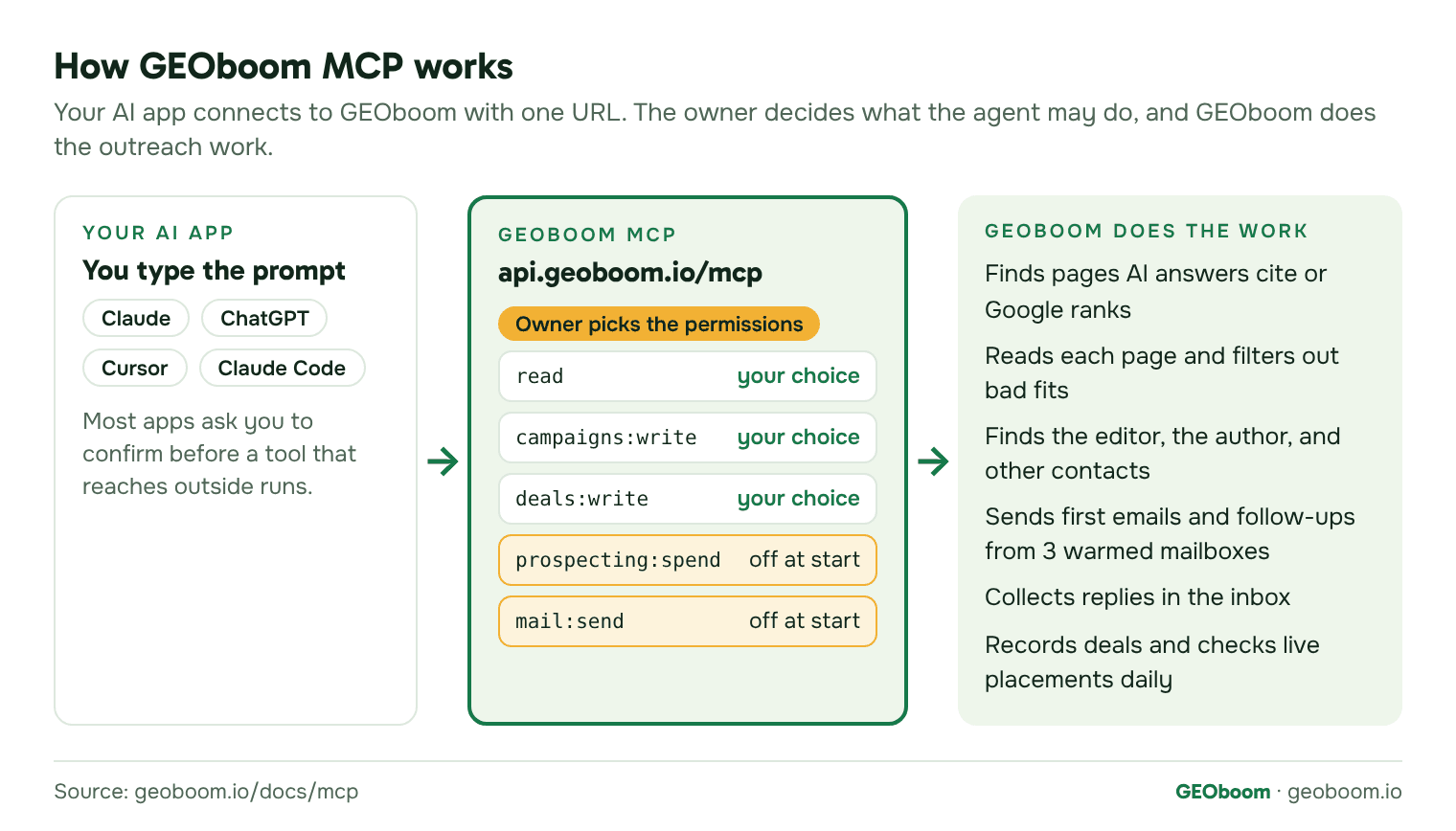
Here's what an agent can do through it, in the order a campaign runs:
- Set up a project and a campaign. One project per website. A campaign is either Link building (pages that rank in Google) or AI answers (pages AI answers cite).
- Find prospects. From keywords, from questions buyers ask AI engines, from a project you track in SE Ranking, or from your own list of URLs.
- Pick what to pitch. GEOboom reads each page for the author, contacts, page type, and fit. The agent marks fits or runs Auto-filter, which shows the rule behind each decision.
- Launch outreach. GEOboom sends first emails and follow-ups from three warmed mailboxes it provides, Monday to Friday, within daily caps.
- Handle replies. The agent reads the inbox, drafts replies for your review, and sends the ones you approve.
- Record deals. It saves the agreed terms, prices, and placements. GEOboom then checks every live placement daily.
Every operation in the GEOboom API is also an MCP tool, with the dot replaced by an underscore: deals.create becomes deals_create. Apps sign in with OAuth 2.1. For apps that can't sign in, an owner can create an API key instead.
If you're new to GEOboom itself, start with how GEOboom works. It explains projects, campaigns, credits, and the inbox in plain words. And to see the kind of page a campaign starts from before you have an account, check one of your keywords free.
How to connect GEOboom MCP
Every app connects to the same URL, https://api.geoboom.io/mcp, and sends you to GEOboom to sign in. Only an organization owner can approve a connection and choose what the agent may do, so the owner should do the first sign-in.
Claude
On a Free, Pro, Max, or Ultra plan, you add the connector to your own account (Anthropic's guide):
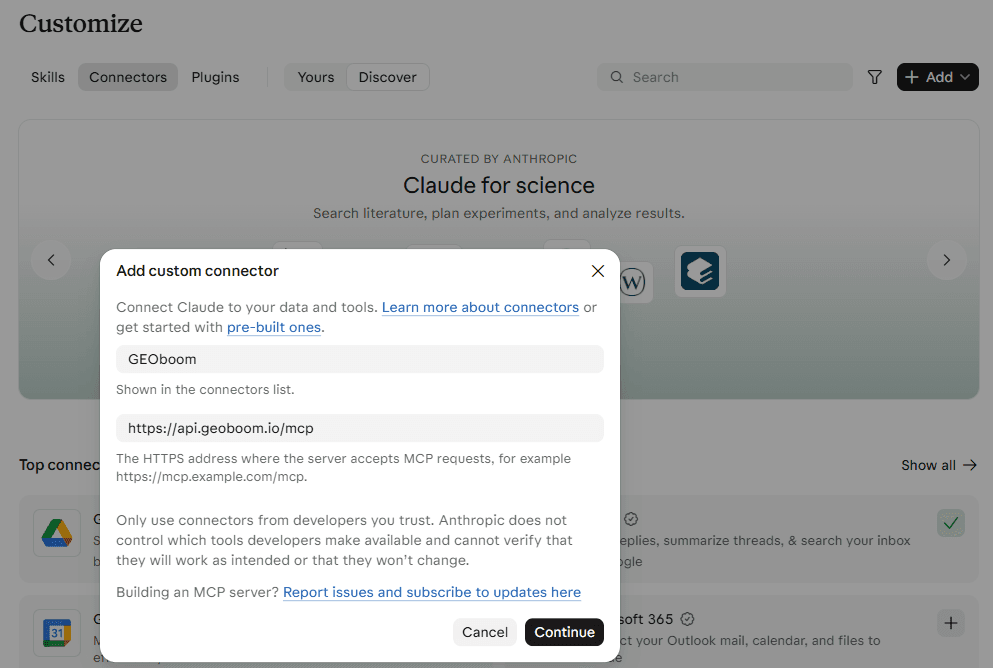
- Go to Customize > Connectors, click Add, then Add custom connector.
- Name it GEOboom, enter https://api.geoboom.io/mcp as the MCP server URL, and click Continue.
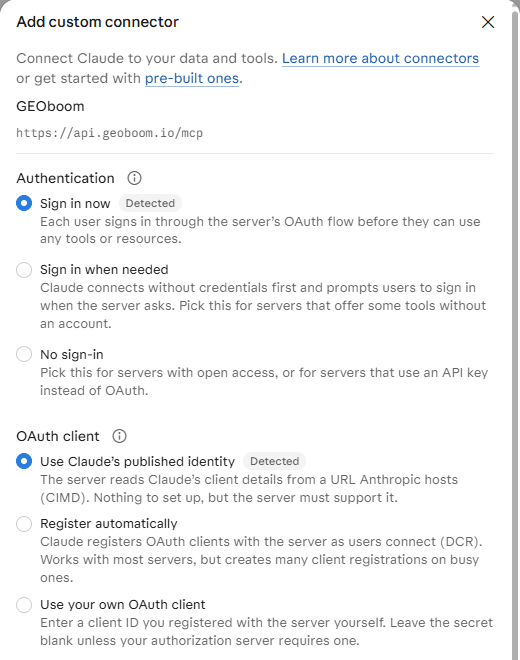
- Claude detects that GEOboom uses sign-in. Keep Sign in now and Use Claude's published identity, and click Add.
- Click Connect, sign in to GEOboom, and approve the permissions.
On a Team or Enterprise plan, an Owner adds it once in Organization settings > Connectors (select Add, then Custom, then Web). Each member then finds GEOboom under Customize > Connectors and clicks Connect. The Free plan allows one custom connector.
ChatGPT
Custom MCP servers in ChatGPT work on the web, not in the mobile app. In Business, Enterprise, and Edu workspaces, admins control who can add one (OpenAI's guide).
- Go to Plugins, click Add, then Add custom MCP server.
- Name it GEOboom. Under Connection, keep Server URL and enter https://api.geoboom.io/mcp.
- Keep OAuth for authentication.
- Review the risk warning, tick I understand and want to continue, and select Create as a plugin.
- Sign in to GEOboom when ChatGPT asks, and approve the permissions.
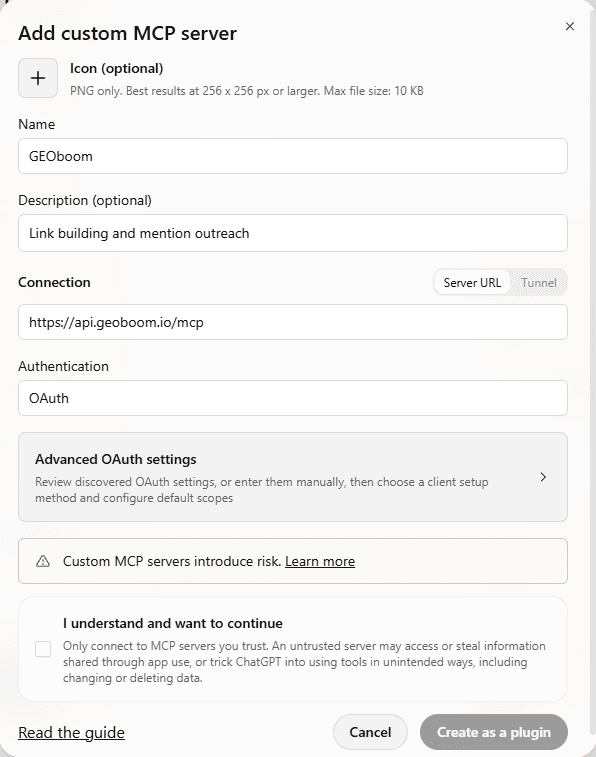
In a chat, type @ and pick GEOboom. ChatGPT asks you to confirm actions that write or send. If your workspace still shows the older settings, the path is Settings > Apps > Create.
Cursor
- Add GEOboom to ~/.cursor/mcp.json (all projects) or .cursor/mcp.json (one project):
{
  "mcpServers": {
    "geoboom": { "url": "https://api.geoboom.io/mcp" }
  }
}- Open Customize in the sidebar, find geoboom, and complete the sign-in Cursor opens in your browser.
- Approve the permissions in GEOboom.
By default, Cursor asks for your approval before it uses an MCP tool (Cursor's guide).
Claude Code
- Add the server:
claude mcp add --transport http geoboom https://api.geoboom.io/mcp- Run /mcp, select geoboom, and choose Authenticate.
- Sign in to GEOboom in the browser that opens, and approve the permissions.
Other MCP apps and API keys
The server uses Streamable HTTP without sessions, so most MCP apps can connect by URL. If an app can't sign in, an owner can create an API key in GEOboom under Settings > Integrations and pick its permissions. Keys start with gbk_ and are shown once. Pass the key as a Bearer token, for example in Claude Code:
claude mcp add --transport http geoboom https://api.geoboom.io/mcp \
--header "Authorization: Bearer gbk_..."A key acts for the person who created it, inside one organization. Owners can see each key's calls and pause or revoke it.
Permissions and safety
The agent works with the permissions the owner approved, and sending and spending are off by default. When the owner approves a connection, there are five permissions to choose from:
| Permission | What the agent can do with it |
|---|---|
| read | View projects, campaigns, prospects, publishers, contacts, deals, and the inbox, including threads |
| campaigns:write | Create and edit projects and campaigns, set up prospecting, import URLs, decide fits, and edit drafts |
| prospecting:spend | Run prospecting, set monthly credit budgets, and turn on automatic scheduling. Starts unticked |
| mail:send | Reply on threads, send first emails, and launch or resume campaigns. Starts unticked. Sent email can't be recalled |
| deals:write | Record deal terms, prices, payments, placements, and whether placements are live |
Some actions stay with people in the app, whatever the permissions: inviting or removing members, creating or widening keys and connections, deleting projects and campaigns, and billing. The agent can archive and pause, but it can't delete.
Checks before anything leaves GEOboom
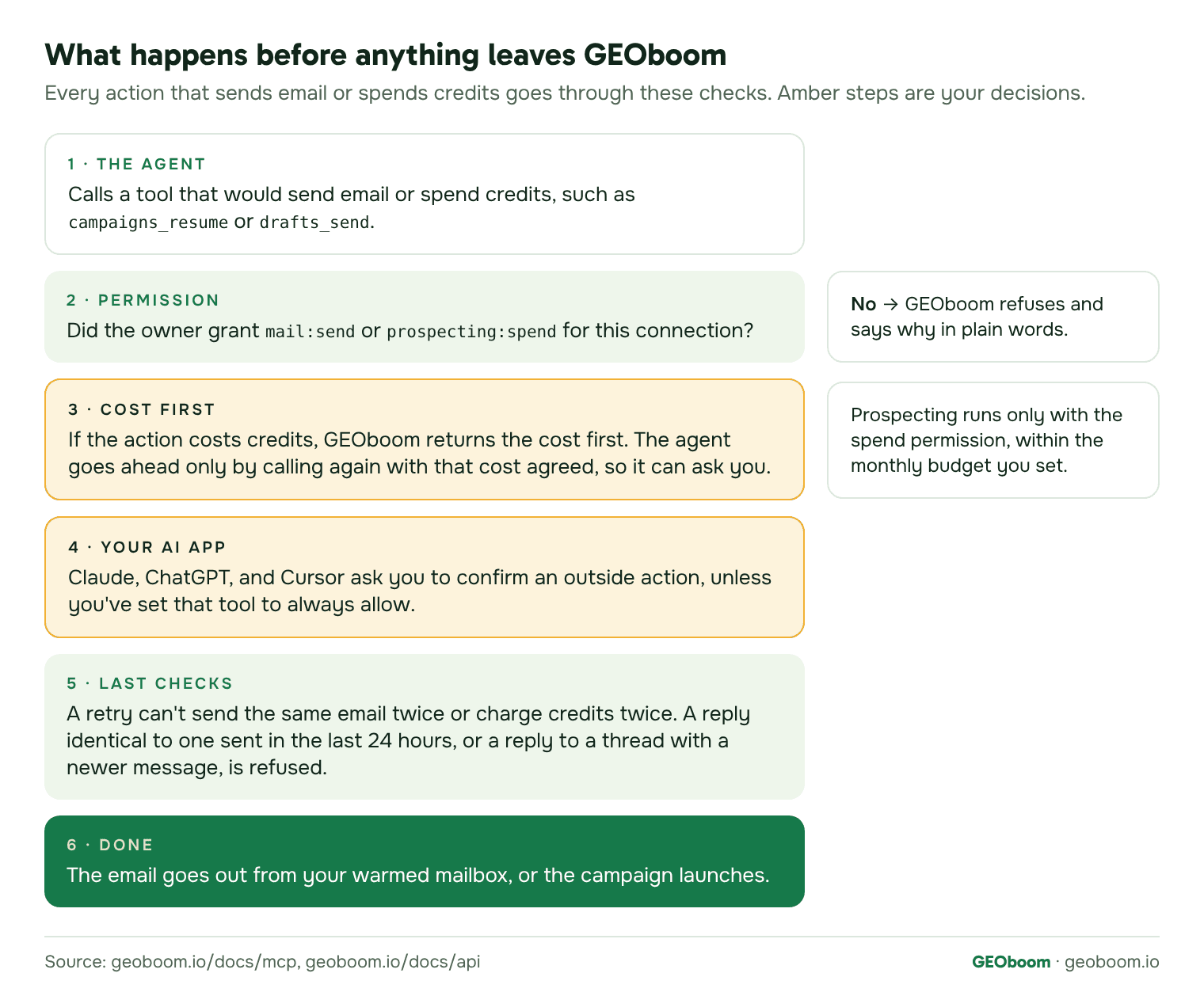
- Cost first. GEOboom shows the cost before a campaign launches and before a draft that costs credits is sent. The agent has to call again with that cost agreed, so it can ask you first. Prospecting runs only with the spend permission, within the monthly budget you set for the project or campaign.
- No double sends or charges. Every action that contacts someone or spends credits carries its own key. If the agent retries, GEOboom returns the first result, so the same email doesn't go out twice and credits aren't charged twice.
- No stale replies. GEOboom refuses a reply that's identical to one sent on the same thread in the last 24 hours. It also refuses a reply if a newer message arrived after the one the agent read.
- Campaigns start paused and empty. Nothing goes out until a campaign is launched.
- Your AI app asks too. Apps show which tools only read and which reach outside, and most ask you to confirm before an outward action runs. In Claude, you can also block single tools under Customize > Connectors by setting them to Blocked.
- Plain refusals. If the agent lacks a permission, credits run out, or an item isn't in your organization, GEOboom says so in plain words, with the same error codes as the API.
From brand to deal, step by step
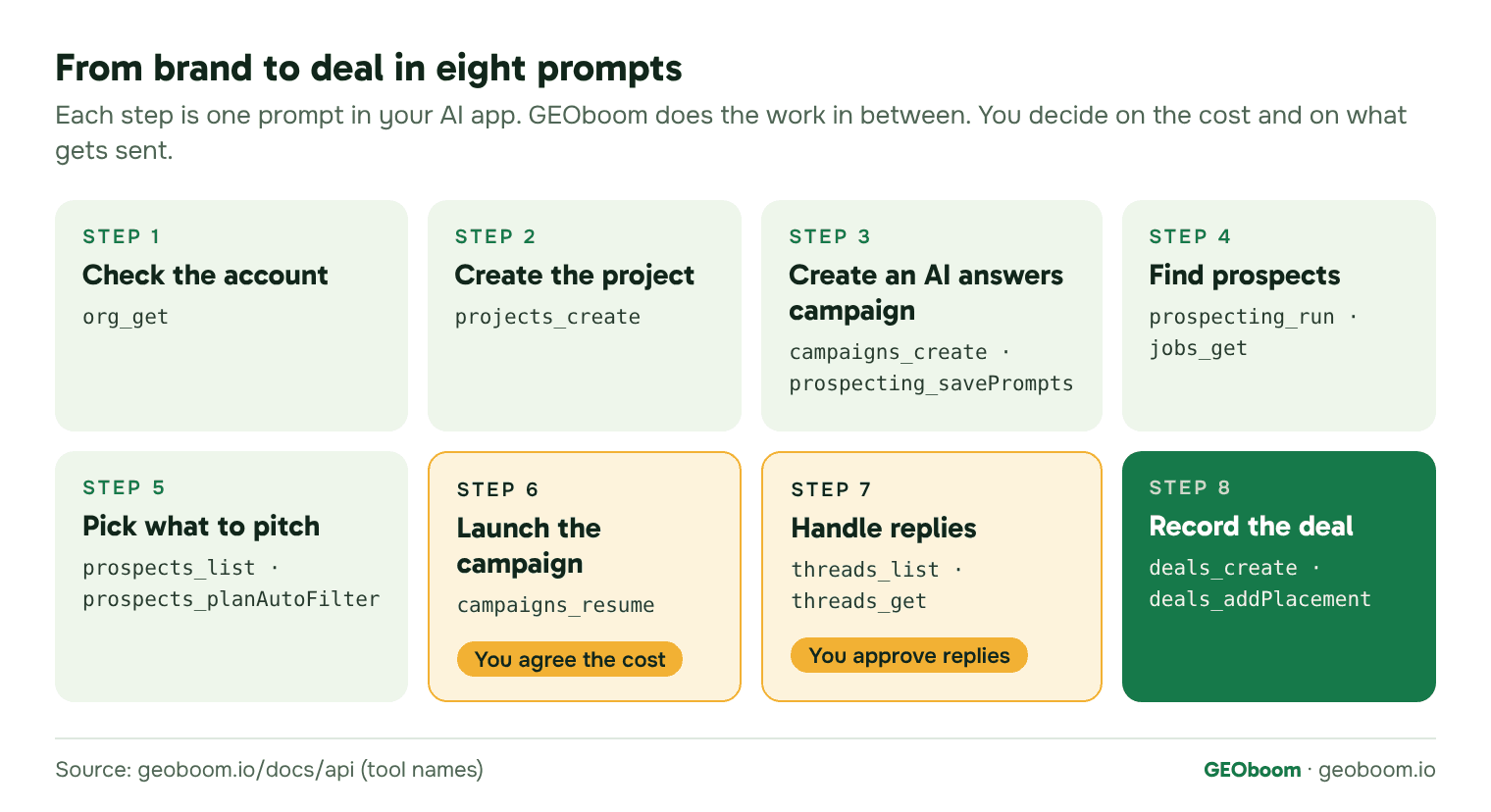
Here's how a campaign runs from chat, from an empty account to a recorded deal, with geoboom.io as the brand. Each step has the prompt to type, the tools the agent calls, and what comes back. Paste the same prompts with your own site.
1. Check the account
Check our GEOboom organization: credits available and whether it's activated.Tools: org_get.
You get back your credit balance, the credits reserved by scheduled outreach, what's available, whether the organization is activated, and whether sending is paused for billing.
2. Create the project
Create a GEOboom project for https://www.geoboom.io. Fill in the brand details from the website. We offer publishers an exchange or payment.Tools: projects_create.
GEOboom creates the project, crawls the site once, and turns on all of your organization's mailboxes for it.
3. Create an AI answers campaign
Create an AI answers campaign in this project. Take prospects from the questions buyers ask AI engines, and save these prompts: best AI link building tools, best link building outreach software, how to get a brand mentioned in ChatGPT answers.Tools: campaigns_create, prospecting_setMode, prospecting_savePrompts. The campaign starts paused and empty.
You get back the new campaign with buyers' prompts as its prospect source. Nothing is sent from it yet.
4. Find prospects
Set a monthly budget of 20 credits for this campaign, then run prospecting and tell me when it's done.Tools: campaigns_setAllowance, prospecting_run, jobs_get, prospecting_latestRun. Prospecting runs in the background, so the agent checks the job until it finishes.
When the job is done, the new pages show up in the campaign as undecided prospects. Failed jobs aren't retried, so the agent tells you and you can run it again.
5. Pick what to pitch
Show the prospects you found, best value first. Then plan the auto-filter and tell me which rule applies to each page. Don't apply it yet.Tools: prospects_list, prospects_planAutoFilter. After you agree, prospects_autoFilter or prospects_setVerdict marks the fits.
You see each page with its decision so far and the rule Auto-filter would apply to it. Reading and filtering pages cost nothing. Credits are spent on publishers you contact.
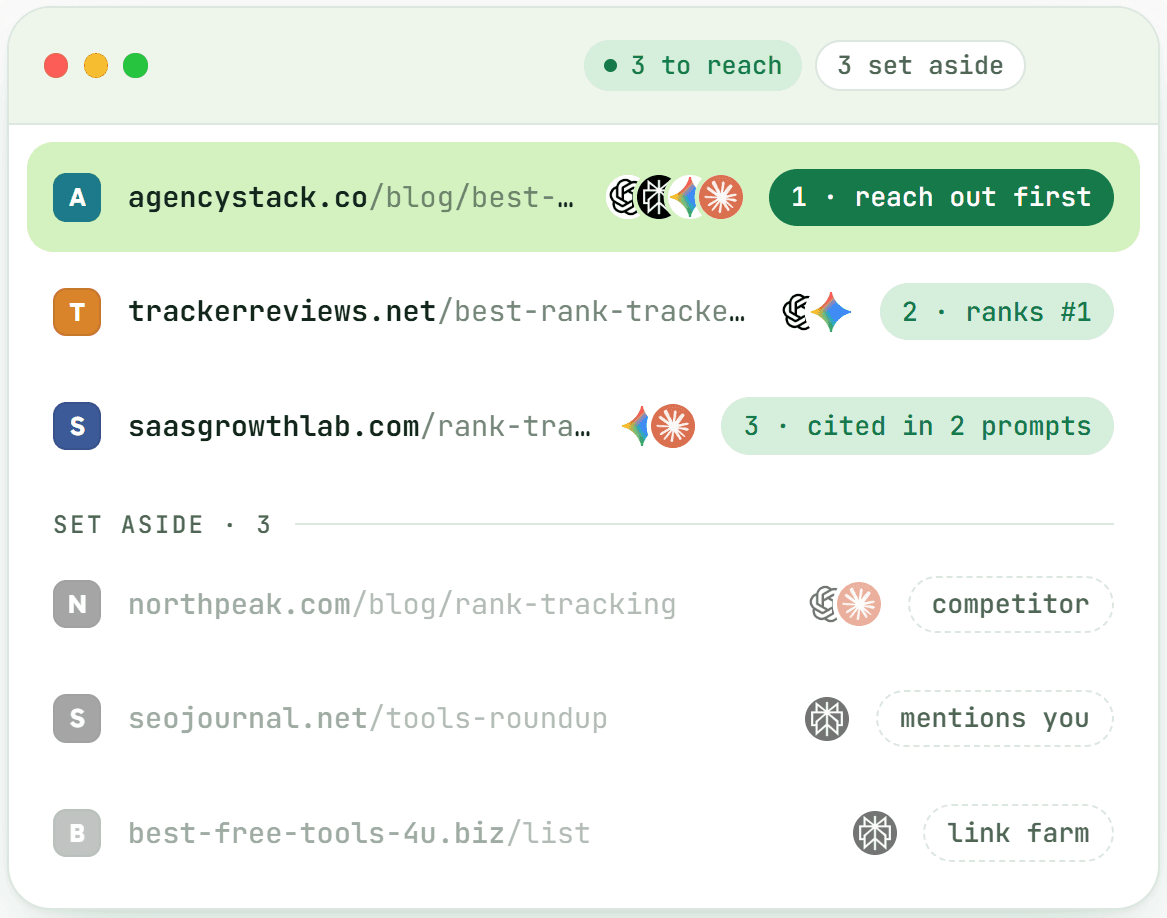
In GEOboom: the pages to pitch first and the ones set aside, with the reason for each.
6. Launch the campaign
Launch the campaign. Tell me the cost first and wait for my yes.Tools: campaigns_resume. The first call returns the cost and your credit picture. The campaign launches only when the agent calls again with that cost agreed. Say yes, and GEOboom starts sending first emails and follow-ups.
If there aren't enough credits, GEOboom refuses and says so in plain words.
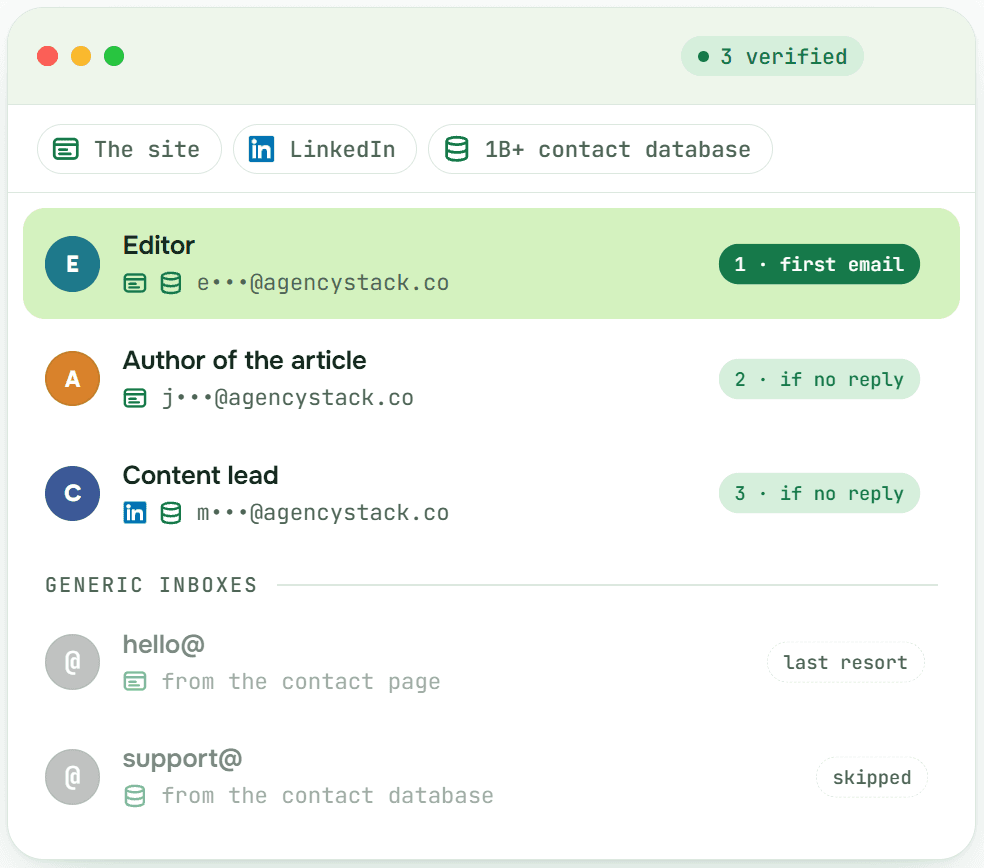
Who GEOboom writes to first after launch, and who gets the follow-ups.
7. Handle replies
List threads that need action, with the site, its DR, and what they're asking for. Draft a reply to each for my review. Don't send anything.Tools: threads_list, threads_get. You read the drafts and decide what goes out. With the send permission, threads_reply sends only the replies you approve.
If a newer message arrives while you're reviewing a draft, GEOboom refuses to send the old reply. You won't answer a message you haven't read.
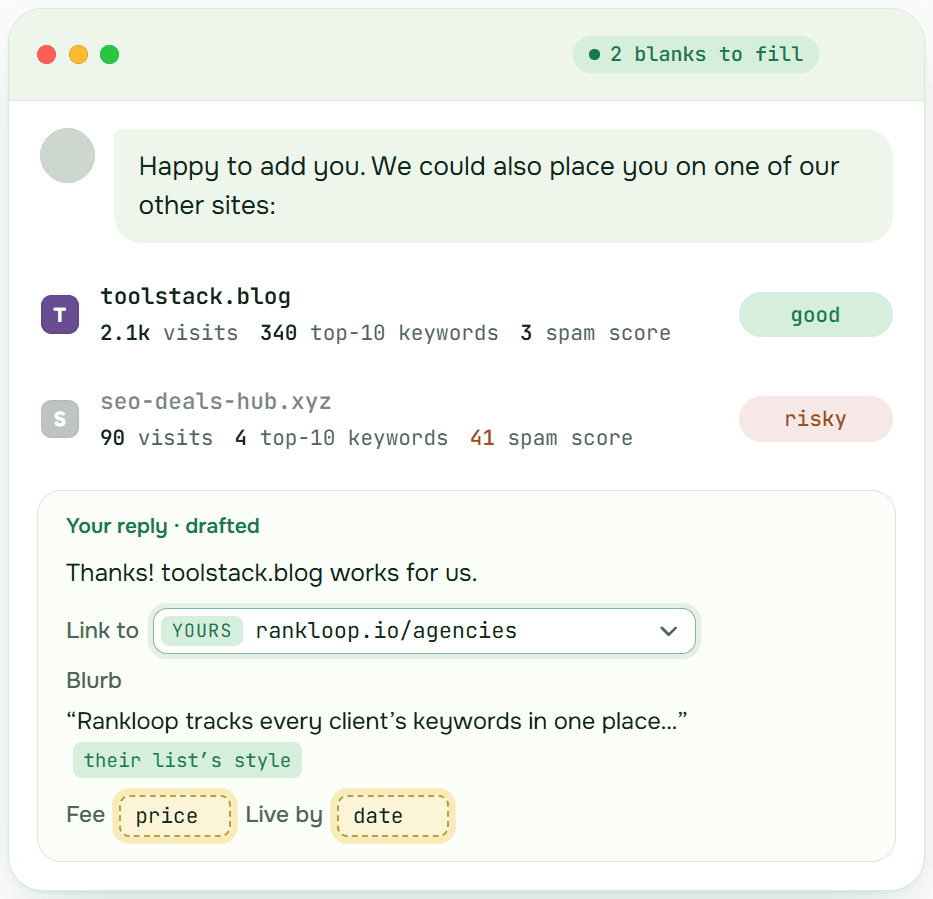
A reply in GEOboom: data on each site the publisher offers and a drafted answer for your review.
8. Record the deal and watch the placements
Save the agreed terms with example.com as a deal: they add us to their list of AI link building tools, we add them to ours, no payment. Then list our deals and flag any placement that isn't live as agreed.Tools: deals_create, deals_addPlacement, deals_list. GEOboom checks each live placement every day and flags broken ones in your inbox.
A deal's status moves from Agreed to Partly live, Live, or Broken as GEOboom checks the pages.
SE Ranking MCP + GEOboom MCP: from AI-cited pages to outreach
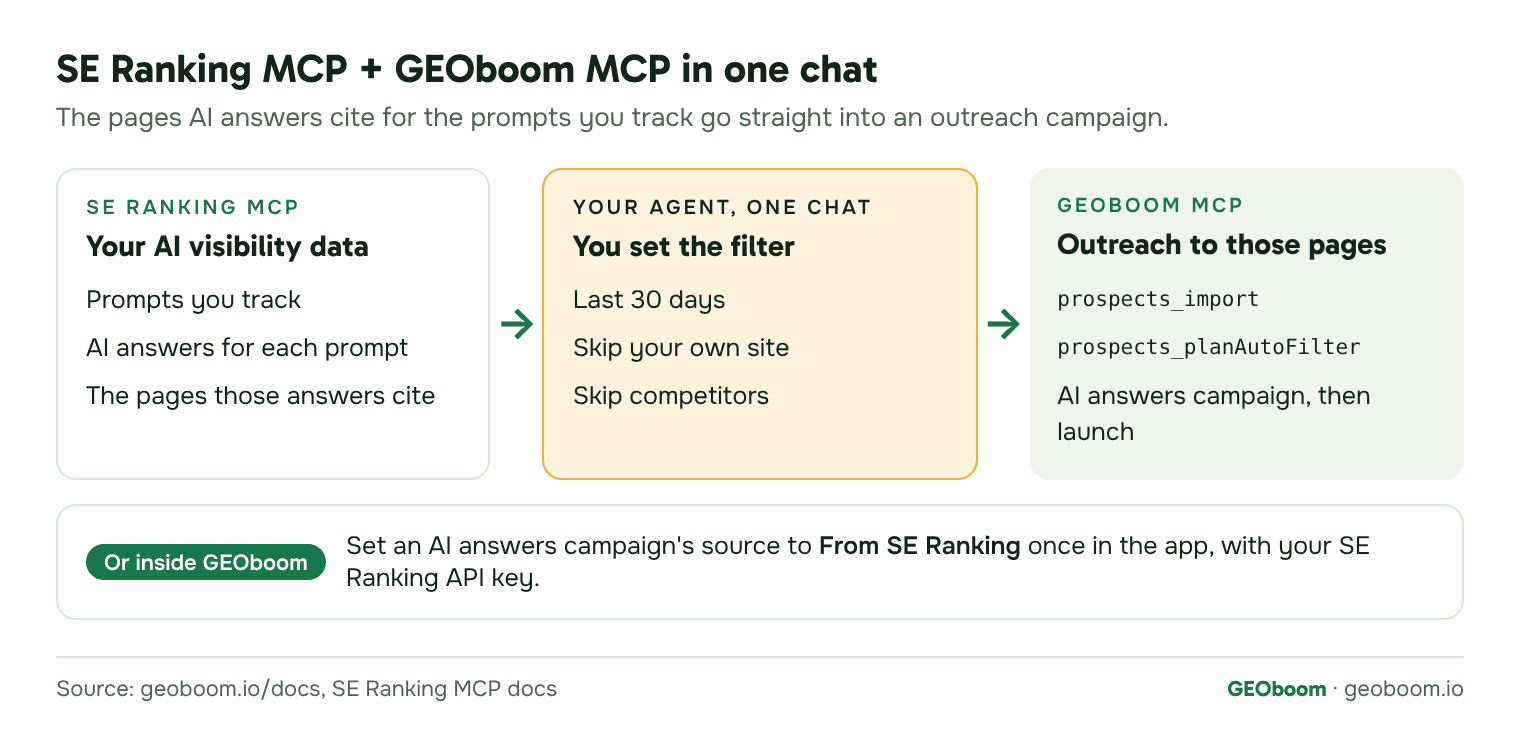
If you track AI visibility in SE Ranking, the pages AI answers cite for your prompts can go straight into a GEOboom outreach campaign. Those are the pages AI already uses to build its answers. There are two ways to do it.
Inside GEOboom
Set up the source once in the app. In an AI answers campaign, pick From SE Ranking as the prospect source and add your own SE Ranking API key. GEOboom then takes the cited pages of a project you track in SE Ranking. After that, the agent can switch a campaign to this source and run it:
Switch the "Q4 AI answers" campaign to the SE Ranking source and run prospecting within the campaign budget.Tools: prospecting_setMode (mode seranking), prospecting_run.
Two MCP servers in one chat
Connect SE Ranking's MCP server next to GEOboom. Its URL is https://api.seranking.com/mcp, and it works in Claude, ChatGPT, Cursor, and other MCP apps. SE Ranking includes MCP in every subscription and charges its API credits. It gives the agent your AI visibility projects, prompts, and sources, so the agent can read the pages AI answers cite and hand them to GEOboom:
In SE Ranking, get the pages AI answers cited for the prompts we track in project geoboom.io over the last 30 days. Skip our own site and our competitors. Import the rest into the "Q4 AI answers" campaign in GEOboom and plan the auto-filter.Tools: SE Ranking's AI visibility sources, then GEOboom's prospects_import and prospects_planAutoFilter. This way you can also trim the list in chat before it goes in.
Copy-paste prompts for link building and mention outreach
Swap in your own site, campaign names, and numbers. Prompts that send or spend need those permissions.
| What you want | Prompt |
|---|---|
| See your credits | Check our GEOboom credits: balance, reserved by scheduled outreach, and available. |
| Start a project | Create a GEOboom project for https://example.com. Fill in the brand details from the website. We offer publishers an exchange or payment. |
| Find pages that rank in Google | Create a Link building campaign in project Example. Find pages ranking in the US for these keywords, and run it weekly: … |
| Find pages AI answers cite | Create an AI answers campaign in project Example and save these buyer prompts: … |
| Cap spending | Set a monthly credit budget of 30 for the "Q4 AI answers" campaign. |
| Use your own list | Import these URLs into the "Q4 AI answers" campaign: … |
| Review prospects | Show undecided prospects in the "Q4 AI answers" campaign, best value first, with page type and whether a contact was found. |
| Filter before you decide | Plan the auto-filter for the "Q4 AI answers" campaign and show which rule applies to each page. Don't apply it yet. |
| Leave out competitors | Mark these sites as competitors in the "Q4 AI answers" campaign: … |
| Launch | Launch the "Q4 AI answers" campaign. Tell me the cost first and wait for my yes. |
| Triage replies | List threads that need action, with the site, its DR, and what they're asking for. |
| Draft a reply | Draft a reply to the thread with example.com that accepts the exchange. Show me the draft and don't send it. |
| Stop outreach to a site | Mark example.com as do not approach. |
| Record a deal | Save the agreed terms with example.com as a deal: they add us to <page> with the anchor <anchor>, we add them to <page>, no payment. |
| Record a payment | Mark the deal with example.com as paid: $120. |
| Check placements | List deals with a broken or partly live placement and what's wrong with each. |
| Monthly report | Summarize this month for project Example: publishers contacted, replies, offers, deals, live placements, and credits spent. |
GEOboom MCP FAQ
What is GEOboom MCP?
It's a remote MCP server at https://api.geoboom.io/mcp. It lets an AI agent do in GEOboom what you can do in the app, from setting up a campaign to recording deals.
Which AI apps work with GEOboom MCP?
Claude on the web and desktop, Claude Code, ChatGPT on the web, Cursor, and other MCP apps that support Streamable HTTP. Apps that can't sign in can use an API key.
Is MCP included in my GEOboom plan?
Yes. MCP is included in every GEOboom plan, from $150 a month. The agent's actions use the same credits as the app.
Can the agent send emails or spend credits without asking?
Not unless the owner gives it those permissions, and both start unticked. Even with them, GEOboom shows the cost before a campaign launches and before a draft is sent. Most AI apps also ask you to confirm actions that reach outside.
Who decides what gets sent to publishers?
You do. The agent drafts replies for your review. Without the send permission, nothing leaves GEOboom. With it, the agent sends what you approve, and most AI apps ask before each send unless you've set that tool to always allow.
What can't the agent do?
It can't invite or remove members, create or widen keys and connections, delete projects or campaigns, or touch billing. It can archive and pause.
Do I need an API key?
No. Claude, ChatGPT, Cursor, and Claude Code sign in with OAuth. Keys are for apps that can't sign in. An owner creates one in GEOboom under Settings > Integrations.
How do I disconnect it?
Remove the connector in your AI app. In Claude, that's Customize > Connectors > Remove. For API keys, an owner can pause or revoke the key in GEOboom.
Does it work with SE Ranking?
Yes, in two ways. An AI answers campaign can take the cited pages of a project you track in SE Ranking, with your own SE Ranking key. Or you connect both MCP servers to one chat and let the agent move the cited pages from SE Ranking into GEOboom.
Is it only for AI answers?
No. Link building campaigns pitch pages that rank in Google for your keywords. AI answers campaigns pitch pages that AI answers cite.
GEOboom MCP docs and references
- GEOboom MCP server: endpoint, sign-in, permissions, and safety defaults.
- GEOboom API reference: every operation, which is also an MCP tool. The full schema is in openapi.json.
- Error codes: what each refusal means.
- How GEOboom works: projects, campaigns, prospect sources, the inbox, deals, and credits. There's also a Markdown version for agents.
- Setup guides from the apps: Claude custom connectors, custom MCP servers in ChatGPT, MCP in Cursor, and SE Ranking MCP.
How this guide was prepared
Oleksii Andrusenko, Head of Marketing at GEOboom and the CEO of GrowPad, wrote this guide. Reviewed by Artur Briugeman, CTO of GEOboom. GEOboom is our product. Tool names and what each step returns come from GEOboom's MCP and API docs and its API schema. Setup steps for Claude, ChatGPT, Cursor, and SE Ranking come from their official docs. We checked all of them on November 17 and 18, 2026.
Related
- 8 Best AI Link Building Tools in 2026, Compared
- Best AI Link Building and Outreach Software 2026: 7 Tools Compared
- Brand Mentions vs Backlinks in AI Search: 15 Studies (2026)
- Case study: brand mentions for a global IT services client
- Case study: a dropped mention, restored the next day
This guide is written by GEOboom, outreach software for getting your brand mentioned on the pages AI answers cite.